
 iPhone Data Recovery
 iOS System Recovery
 iOS Backup & Restore
 iOS WhatsApp Transfer
 iOS FoneTrans
 MobieSync
 Android Data Recovery
 Broken Android Data Extraction
 Android Data Backup & Restore
 iPhone Unlocker
 Best Samsung Phone Unlock Tool
 Android Unlocker
 Win/Mac Data Recovery
 iDATAPP Screen Recorder
 2D&3D Video Converter
 Video Repair Software Ai
 AI Video Converter
 Ai Blu-ray Player
 How to Use Vnrom Bypass Android 16 APK?
VNROM Bypass APK remains a useful free FRP workaround for some Android 16 devices, but modern security patches often block it. This guide covers three effective methods, including a one-click unlock tool.
Why Android 16 Makes FRP Bypass More Difficult Than Before?
You reset your Android phone, expecting a clean start. Instead, after selecting the language and connecting to Wi-Fi, you are greeted with a message:
“This device was reset. To continue, sign in with a Google Account that was previously synced on this device.”
At that moment, many users realize they either:
- Forgot the Google account credentials.
- Bought a second-hand device with FRP still enabled.
- Reset the phone after too many failed password attempts.
- Changed their Google password and cannot verify the device.
This security feature is called Factory Reset Protection (FRP).
Google introduced FRP to prevent stolen phones from being reactivated without authorization. Starting with Android 16, FRP protection became more aggressive. Many older tricks—such as opening Chrome from the setup screen—are now blocked.
That is why users continue searching for terms like:
- VNROM Bypass Android 16 APK
- Download VNROM FRP bypass APK
- How to use VNROM on Android 16
- Android 16 FRP bypass free
The good news is that there are still several working solutions.
This article explains how VNROM Bypass APK works, when it fails, and the best alternatives available today.
Guide List
- Why Android 16 Makes FRP Bypass More Difficult Than Before?
- What Is VNROM Bypass APK?
- Does VNROM Bypass APK Work on Android 16?
- Method 1: Use VNROM Bypass APK on Android 16 (Free)
- Method 2: Use iDATAPP Android Unlocker (Fastest and Most Reliable)
- Method 3: Use Android 16 Accessibility and Settings Trick
- Which Method Should You Choose?
- Recover Data Lost After FRP Lock or Failed Reset
- Frequently Asked Questions
What Is VNROM Bypass APK?
VNROM Bypass APK is a small Android application created to help users access device settings when they are locked by Google FRP.
The APK itself does not directly remove FRP. Instead, it exploits setup loopholes to let you:
- Open device settings.
- Add a new Google account.
- Restart the phone.
- Complete setup without the previous account.
For older Android versions, this method was extremely effective.

For Android 16, success depends on:
- Device manufacturer (Samsung, Xiaomi, Motorola, etc.)
- Security patch date
- Whether browser access is still available
- USB OTG support
Does VNROM Bypass APK Work on Android 16?
It Works Best When:
- The phone still allows access to browser or file manager.
- Security patch is not the latest release.
- You have an OTG drive or can send APK files via USB.
It May Fail When:
- Android 16 blocks unknown app installation.
- Setup wizard disables browser access.
- Manufacturer patches all bypass routes.
In practice, VNROM is a useful free method but no longer the most reliable one.
Method 1: Use VNROM Bypass APK on Android 16 (Free)
VNROM remains the classic FRP bypass solution. It is ideal for users who want a free approach and are comfortable following several manual steps. On some Android 16 phones, you can still install the APK through an OTG drive or browser trick, add a new Google account, and complete setup normally.
Step-by-Step Guide
1.Download the VNROM Bypass APK from the official VNROM website.
2.Copy the APK to a USB flash drive.
3.Connect the USB drive using an OTG adapter.
4.On the FRP screen, open the file manager.
5.Install the APK.
6.Go to Settings > Accounts.
7.Add a new Google account.
8.Restart the device.
9.Finish setup using the newly added account.
Important Notes
- You may need to enable “Install unknown apps.”
- Not all Android 16 devices permit APK installation.
- Remove the OTG drive only after installation is complete.
Method 2: Use iDATAPP Android Unlocker (Fastest and Most Reliable)
When VNROM fails, the most efficient alternative is iDATAPP Android Unlocker.
This desktop utility is designed to remove FRP locks and screen locks from Samsung, Xiaomi, OPPO, Vivo, Motorola, Huawei, and many other Android devices. Unlike manual APK-based methods, it automates the bypass process and requires very little technical knowledge.
Why It Stands Out
- Supports Android 6 through Android 16
- Removes Google FRP lock
- Unlocks PIN, password, pattern, and fingerprint
- Clear on-screen instructions
- High success rate on newer devices
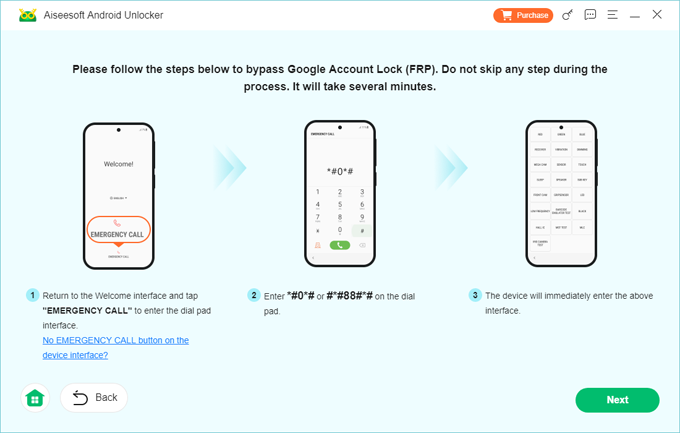
Step-by-Step Guide
1.Download and install iDATAPP Android Unlocker on your computer.
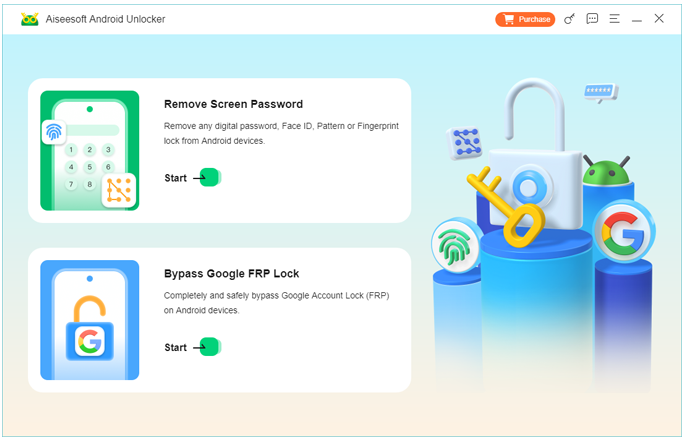
2.Launch the software and choose Bypass Google FPR Lock.
3.Connect the locked phone with a USB cable.
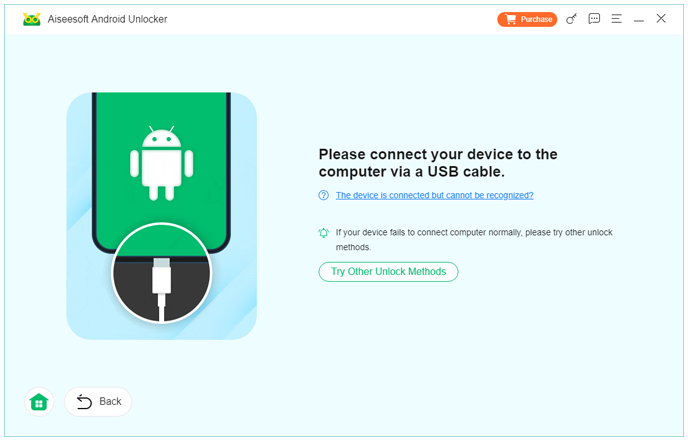
4.Select your device brand.
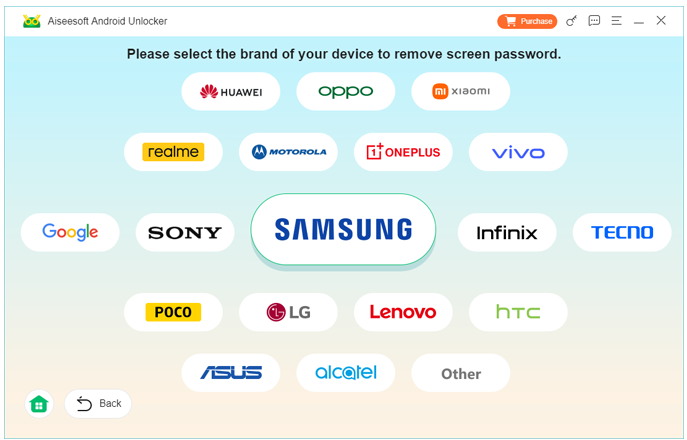
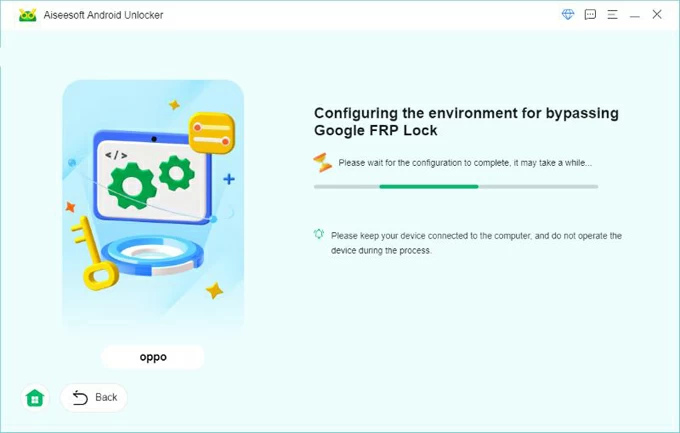
5.Follow the instructions to place the phone into the required mode.
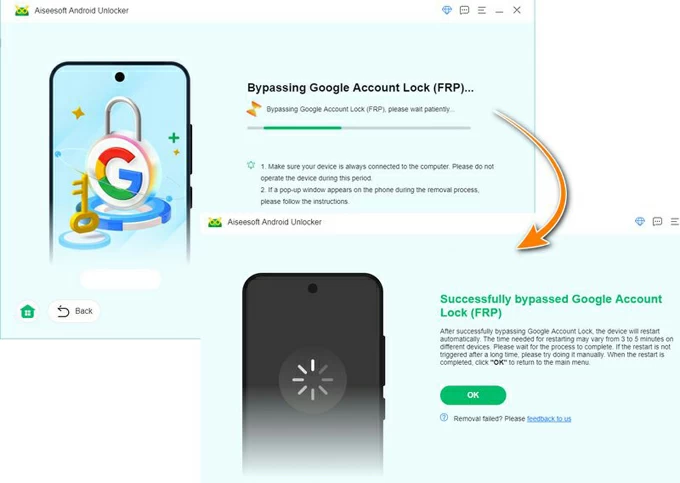
6.Click Bypass Now and wait for the software to remove FRP.
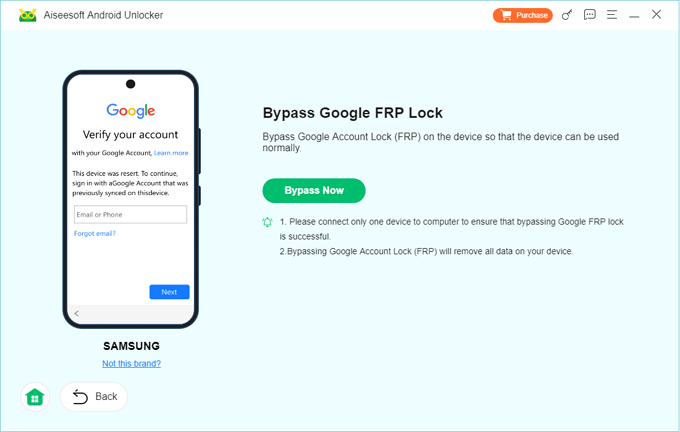
7.Restart the phone and complete setup.
Important Notes
- Some models may erase device data.
- Use the original USB cable for best results.
- Keep the battery above 50%.
Method 3: Use Android 16 Accessibility and Settings Trick
On certain devices, you can still use accessibility options to open settings and add a new Google account manually.
This approach is entirely free and does not require any APK downloads.
Step-by-Step Guide
1.On the setup screen, activate TalkBack.
2.Draw an “L” gesture.
3.Open TalkBack Settings.
4.Access Help & Feedback.
5.Open a YouTube video.
6.Tap the account icon and open browser access.
7.Go to Google account settings.
8.Add a new Google account.
9.Restart the phone.
Important Notes
- Some Android 16 builds block YouTube and browser access.
- Gestures may vary by manufacturer.
- Patience is important because this method can be inconsistent.
Which Method Should You Choose?
| Situation | Best Method |
|---|---|
| You want a free solution | VNROM APK |
| VNROM no longer works | iDATAPP Android Unlocker |
| You prefer no downloads | Accessibility trick |
| Device uses latest Android 16 patch | iDATAPP Android Unlocker |
| You need the highest success rate | iDATAPP Android Unlocker |
Recover Data Lost After FRP Lock or Failed Reset
FRP lock often appears after a factory reset, but the bigger issue is what happens before that reset.
Many users erase their phones hoping to remove a forgotten screen lock. After bypassing FRP, they realize that important files are gone:
- Photos and videos
- WhatsApp chats
- Contacts
- Notes
- Documents
This is especially common on Samsung, Xiaomi, and Google Pixel devices.
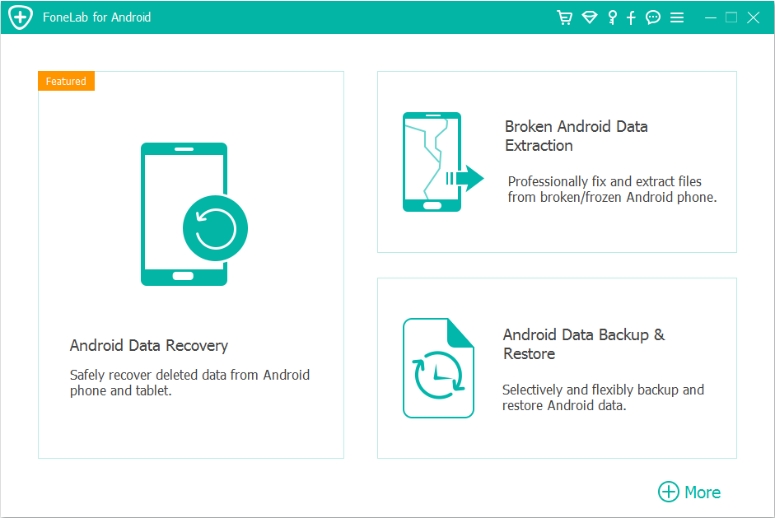
Fortunately, iDATAPP Android Data Recovery can help restore deleted or inaccessible data from Android phones and tablets.
What It Can Recover
- Deleted images and videos
- SMS and call history
- WhatsApp and attachments
- Contacts and notes
- Files from internal storage and SD cards
Real-World Example
Imagine resetting your Samsung phone to solve a lock issue. After successfully removing FRP, your family photos and business contacts are missing.
With iDATAPP Android Data Recovery, you can scan the device, preview recoverable files, and restore only the items you need.
How It Works
- Install the recovery software on your computer.
- Connect the Android device.
- Select data categories to scan.
- Preview found files.
- Recover them to your computer.
This makes it a valuable companion tool whenever unlocking or resetting a device puts data at risk.
Explore more Android tools at iDATAPP Official Website.
Frequently Asked Questions
Is VNROM Bypass APK free?
Yes. VNROM Bypass APK is a free FRP workaround tool.
Does VNROM work on Android 16?
It can work on some devices, but newer security patches may block it.
Is FRP bypass legal?
Bypassing FRP is generally acceptable on a device you own or are authorized to repair.
Will FRP bypass erase my data?
If the device was already factory reset, data is usually gone. Some unlocking methods may also wipe data.
Which method is most reliable?
iDATAPP Android Unlocker offers the highest success rate and the simplest process.
Conclusion
VNROM Bypass APK remains a useful free FRP bypass option, but Android 16 has made manual methods less dependable. If you want a faster and more consistent result, iDATAPP Android Unlocker is the most practical solution. For users concerned about data loss after unlocking, iDATAPP Android Data Recovery provides an effective way to restore important files.
 English
 Nederlands
 Tiếng Việt
 日本
日本 Español
 Português
 Deutsche
 Français
 Italiano
 Norsk
Norsk Suomalainen
 Svenska
 Dansk
Dansk Ελληνικά
 Türk
Türk русский
 हिंदी
हिंदी தமிழ்
தமிழ் Bahasa Melayu
 ไทย
ไทย 한국어
한국어 Română
 Polskie
 қазақ
қазақ Gaeilge
 繁體中文
繁體中文