
 iPhone Data Recovery
 iOS System Recovery
 iOS Backup & Restore
 iOS WhatsApp Transfer
 iOS FoneTrans
 MobieSync
 Android Data Recovery
 Broken Android Data Extraction
 Android Data Backup & Restore
 iPhone Unlocker
 Best Samsung Phone Unlock Tool
 Android Unlocker
 Win/Mac Data Recovery
 iDATAPP Screen Recorder
 2D&3D Video Converter
 Video Repair Software Ai
 AI Video Converter
 Ai Blu-ray Player
 How to Recover Lost Data from Xiaomi 17T?
Recovering lost data from Xiaomi 17T is often possible using iDatApp Android Data Recovery or existing cloud backups. Quick action, careful recovery, and regular backups provide the best long-term protection.
Losing important files on a smartphone always seems to happen at the worst possible moment. Perhaps you accidentally deleted family photos while organizing your gallery, your Xiaomi 17T suddenly restarted after a system update, or a factory reset erased months of messages and work documents. Whatever the reason, data loss can feel permanent—but in many situations, it isn't.

The Xiaomi 17T is expected to offer powerful hardware, fast storage, and Xiaomi's latest HyperOS experience. While these improvements enhance performance, they also make users rely even more on their phones for everyday tasks. Photos, WhatsApp conversations, contacts, notes, videos, recordings, and downloaded files often exist only on the device. Once they disappear unexpectedly, finding a reliable recovery method becomes the priority.
Fortunately, data recovery isn't simply a matter of luck. The success rate depends largely on what happened after the files disappeared. If new data hasn't overwritten the deleted storage space, recovery is often possible. Even when recovery isn't possible directly from internal storage, backups created through Xiaomi Cloud or Google services may still contain your missing information.
This guide explains two practical ways to recover lost data from Xiaomi 17T, helping you choose the most appropriate solution based on your situation. It also shares useful advice for preventing future data loss and introduces another helpful iDatApp solution for Xiaomi users.
Before You Attempt Recovery
A few simple precautions can significantly improve your chances of recovering deleted files.
- Stop using the Xiaomi 17T immediately after noticing data loss.
- Avoid installing new applications or recording new videos.
- Disable automatic downloads whenever possible.
- Keep the phone sufficiently charged before beginning recovery.
- Prepare a USB cable if computer-based recovery is required.
These small actions reduce the chance of deleted data being permanently overwritten.
Method 1: Recover Lost Xiaomi 17T Data with iDatApp Android Data Recovery
If your deleted files aren't available in a backup, dedicated recovery software offers the most practical option. iDatApp Android Data Recovery is designed to scan Android devices for recoverable content, allowing users to preview supported file types before restoring them. Instead of recovering everything blindly, it focuses on helping users locate specific photos, contacts, messages, videos, call history, and other commonly lost files. This approach is especially useful after accidental deletion, formatting, or certain system-related issues, provided the original data has not already been overwritten.
Recovery Steps
Step 1: Install the software
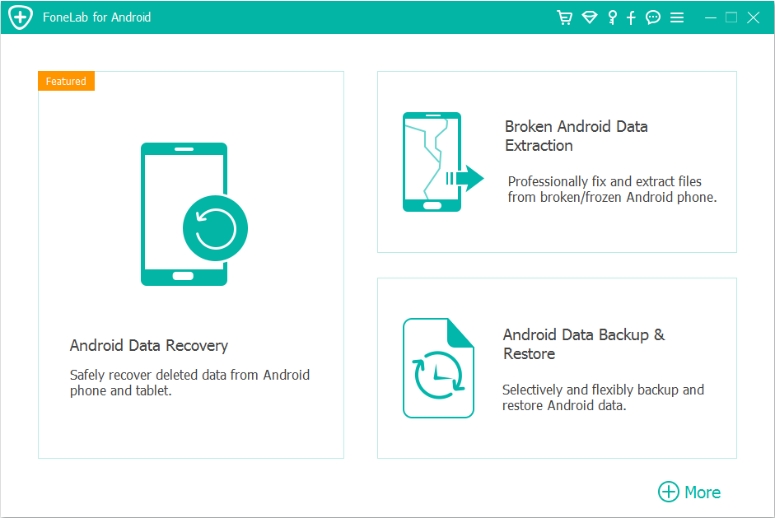
Download and install iDatApp Android Data Recovery and lunch the program on your Windows or Mac computer.
Step 2: Connect your Xiaomi 17T
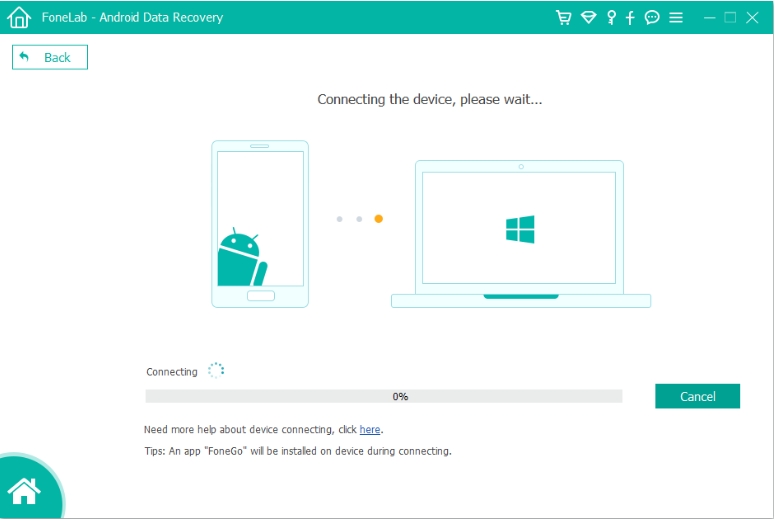
Use the original USB cable to connect your phone.
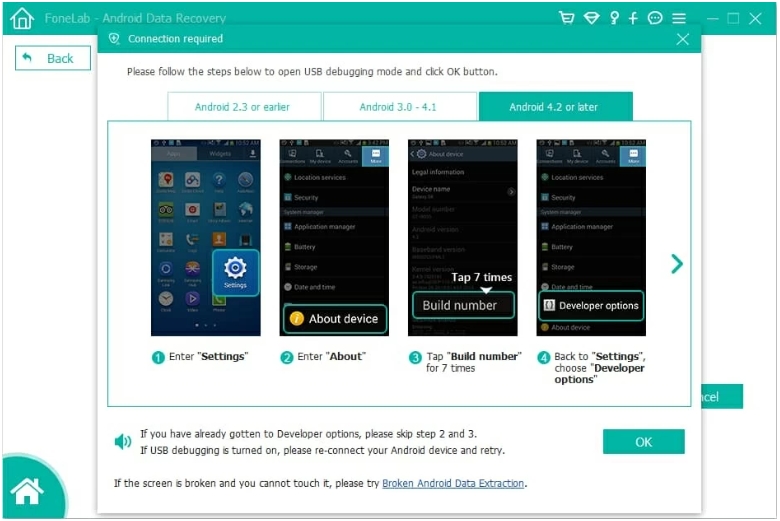
If prompted, enable USB Debugging by following the instructions displayed on the screen.
Step 3: Select data types
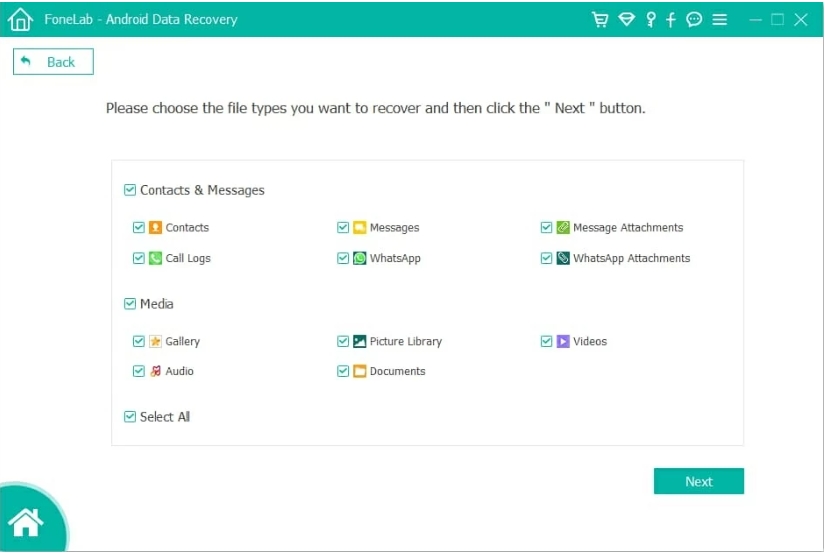
Choose the categories you want to recover, such as:
- Photos
- Videos
- Contacts
- SMS
- Documents
- Audio files
Scanning only necessary categories usually reduces scan time.
Step 4: Start scanning
Allow the software to analyze the device.
Depending on storage size, the scan may take several minutes.
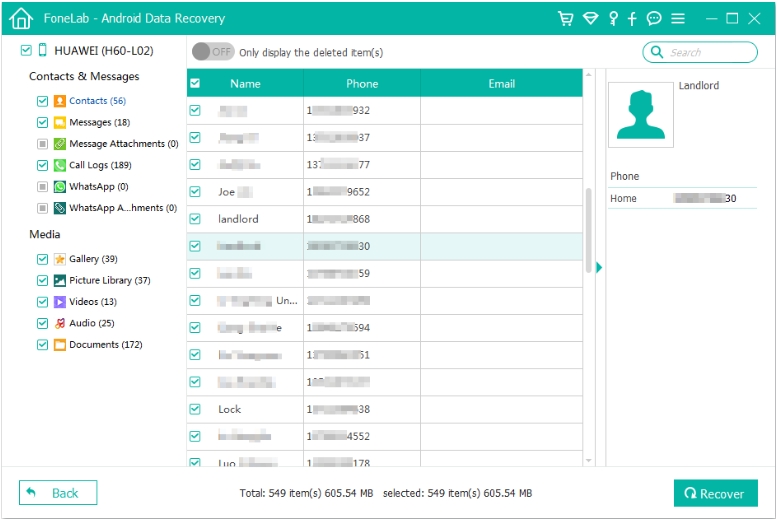
Step 5: Preview recoverable files
Browse the scan results carefully.
Many recoverable items can be previewed before restoration, making it easier to locate exactly what you need.
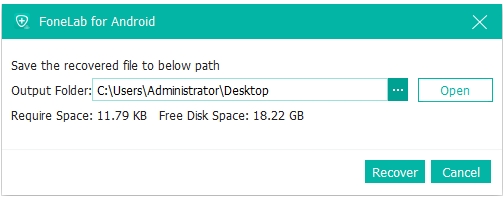
Step 6: Recover data
Select the desired files and save them to your computer instead of restoring them directly back to the phone.
Tips
- Avoid using the phone during scanning.
- Save recovered files on your computer first.
- Perform recovery as soon as possible after deletion for better results.
Method 2: Restore Data from Xiaomi Cloud or Google Backup
Not every recovery requires specialized software. If your Xiaomi 17T regularly synchronized data with Xiaomi Cloud or Google services, your missing information may already exist in an online backup. This method works especially well after factory resets, device replacement, accidental deletion of synchronized contacts, or restoring a newly configured phone. Although cloud backups cannot recover every deleted file, they often restore contacts, calendars, photos, application settings, and other important personal information with minimal effort.
Recovery Steps
Step 1: Check Xiaomi Cloud
Open: Settings → Xiaomi Account → Xiaomi Cloud
Review whether synchronization was enabled before data loss.
Step 2: Restore synchronized data
Select available categories such as:
- Contacts
- Notes
- Gallery
- Messages
Restore whichever data is available.
Step 3: Verify Google backup
Go to: Settings → Google → Backup
Check your most recent backup date.
Step 4: Restore during setup if necessary
If you're setting up the Xiaomi 17T after a reset, sign in with the same Google account used previously.
Choose the available backup when prompted.
Step 5: Confirm restoration
After synchronization completes, verify that your contacts, photos, and other supported files have returned successfully.
Tips
- Connect to a stable Wi-Fi network.
- Keep the device charging during restoration.
- Leave synchronization enabled for future protection.
Beyond Recovery: Moving Data to a New Xiaomi Device Without Losing Anything
Data recovery solves one problem, but another challenge frequently affects Xiaomi users: transferring everything safely to a new phone.
Many people upgrade their devices every few years. During migration, it's surprisingly common to discover that certain files never made it to the new phone. Photos might transfer successfully while WhatsApp attachments, call history, music, downloaded documents, or application data remain behind. In some cases, interruptions caused by unstable Wi-Fi or insufficient storage leave the migration incomplete, forcing users to repeat the entire process.
A dedicated phone transfer solution can simplify this transition. iDatApp offers tools designed to move personal data between smartphones while preserving file organization and reducing the risk of missing important content. Instead of manually copying folders one by one, compatible data categories can be transferred in a structured manner, making the migration process more efficient.
Before starting any phone migration, it is wise to organize unnecessary files, remove duplicate photos, and ensure both devices have sufficient battery power. Using original USB cables or a reliable connection also helps prevent interruptions during the transfer process.
Even after completing the migration, avoid immediately erasing your old Xiaomi phone. Spend some time checking your gallery, contacts, documents, notes, downloaded files, and messaging applications on the new device. Once everything has been verified, create a fresh backup so that future recovery becomes much easier.
Whether you're recovering deleted files or preparing for your next Xiaomi upgrade, establishing a consistent backup routine remains the best long-term protection against unexpected data loss.
Frequently Asked Questions
1. Can permanently deleted photos from Xiaomi 17T still be recovered?
Sometimes. If the deleted storage has not been overwritten by new data, recovery software may still detect recoverable files.
2. Will a factory reset erase everything?
Yes. A factory reset typically removes personal data stored internally. Restoring from a previous backup is usually the easiest solution afterward.
3. Is USB Debugging required for computer-based recovery?
In many recovery situations, enabling USB Debugging allows the computer to communicate properly with the Xiaomi device during scanning.
4. How can I improve the chances of successful recovery?
Stop using the phone immediately after data loss, avoid creating new files, and begin recovery as soon as possible.
5. What is the best way to prevent losing data again?
Enable Xiaomi Cloud or Google Backup, create regular local backups, and keep important files stored in more than one location whenever possible.
Final Thoughts
Recovering lost data from a Xiaomi 17T doesn't have to be overwhelming. Whether you rely on iDatApp Android Data Recovery to scan for deleted files or restore information from Xiaomi Cloud or Google Backup, acting quickly gives you the best chance of success. More importantly, establishing a consistent backup routine today can save countless hours of frustration in the future.
 English
 Nederlands
 Tiếng Việt
 日本
日本 Español
 Português
 Deutsche
 Français
 Italiano
 Norsk
Norsk Suomalainen
 Svenska
 Dansk
Dansk Ελληνικά
 Türk
Türk русский
 हिंदी
हिंदी தமிழ்
தமிழ் Bahasa Melayu
 ไทย
ไทย 한국어
한국어 Română
 Polskie
 қазақ
қазақ Gaeilge
 繁體中文
繁體中文