
 iPhone Data Recovery
 iOS System Recovery
 iOS Backup & Restore
 iOS WhatsApp Transfer
 iOS FoneTrans
 MobieSync
 Android Data Recovery
 Broken Android Data Extraction
 Android Data Backup & Restore
 iPhone Unlocker
 Best Samsung Phone Unlock Tool
 Android Unlocker
 Win/Mac Data Recovery
 iDATAPP Screen Recorder
 2D&3D Video Converter
 Video Repair Software Ai
 AI Video Converter
 Ai Blu-ray Player
 [Official]How to Bypass Motorola Google Lock?
This guide explains why Motorola Google Lock occurs and presents three effective bypass methods, including a professional solution, plus recovery options for common post-unlock data loss issues.
Factory Reset Protection (FRP), commonly called Google Lock, is designed to protect Motorola phones from unauthorized use. But in real life, this security feature often locks out legitimate owners. You reset your Motorola phone, sign in with the wrong Google account, and suddenly the device becomes unusable.

This article goes beyond surface-level tips. We’ll analyze why Motorola Google Lock happens, explain how FRP works on Motorola devices, and then walk through three effective, real-world methods to bypass Motorola Google Lock—including one professional solution using our own software.
If you’re a genuine Motorola owner locked out of your device, this guide is built for you.
Guide List
- Why It Happens and Why It’s Hard to Bypass
- Method 1: Bypass Motorola Google Lock Using Android Unlocker (Recommended)
- Method 2: Bypass Motorola Google Lock via Google Account Recovery (Official Path)
- Method 3: Bypass Motorola Google Lock Using Built-In Accessibility Loopholes
- Data Loss After Unlocking or System Crash (Extended Solution)
- Frequently Asked Questions
Why It Happens and Why It’s Hard to Bypass
Motorola phones run close-to-stock Android, which makes Google’s security mechanisms stricter than many other brands. Once a Google account is added to a Motorola device, that account becomes deeply tied to the system.
When you perform a factory reset without first removing the Google account, Android automatically activates FRP. During setup, the phone demands the previously synced Google account. Without it, you’re stuck at the verification screen.
Common reasons Motorola users face Google Lock:
- You forgot the Google account used on the device
- You bought a second-hand Motorola phone
- A system crash forced a reset
- A child or family member reset the phone accidentally
- Screen damage prevented proper account removal before reset
FRP is powerful—and that’s exactly why bypassing it requires precision, patience, and the right approach.
Method 1: Bypass Motorola Google Lock Using Android Unlocker (Recommended)
This is the most reliable, time-efficient, and beginner-friendly method, especially for users who don’t want to risk system instability or endless trial-and-error.
The Android Unlocker from iDatApp is designed specifically for Android lock-related issues, including Motorola Google FRP lock. Unlike risky manual tricks, this method works through a guided process that communicates directly with the phone’s system.
What makes this method stand out is its modern workflow, inspired by the latest device-unlock logic: connect, verify, download the correct firmware environment, and safely remove the Google account lock—without rooting.
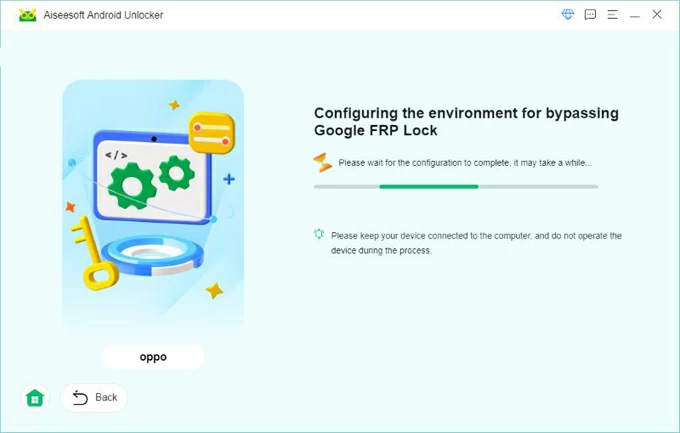
Steps to Bypass Motorola Google Lock Using Android Unlocker:
1.Download and install Android Unlocker on your computer
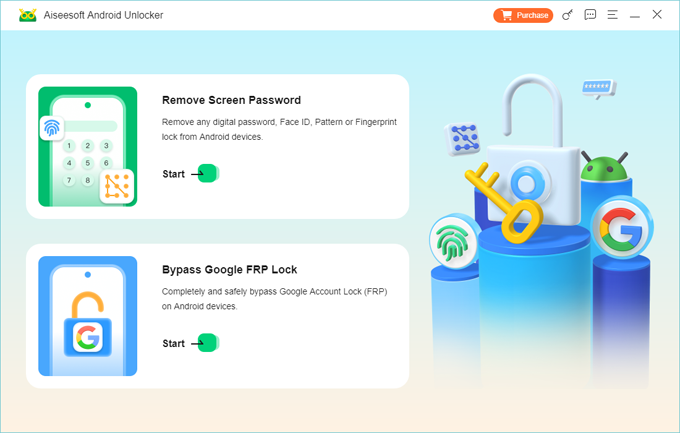
2.Launch the software and choose “Bypass Google FRP Lock”
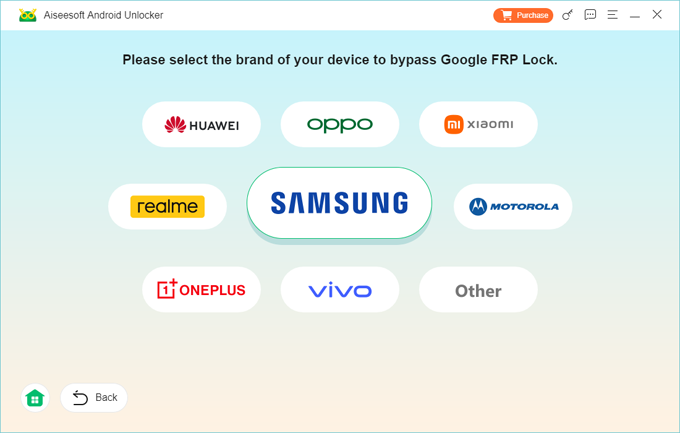
3.Connect your Motorola phone via USB cable
4.The software automatically matches your Motorola model or you can select your motorola model.
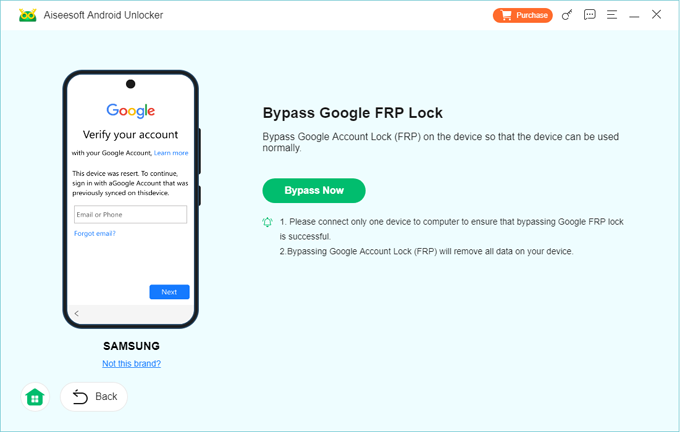
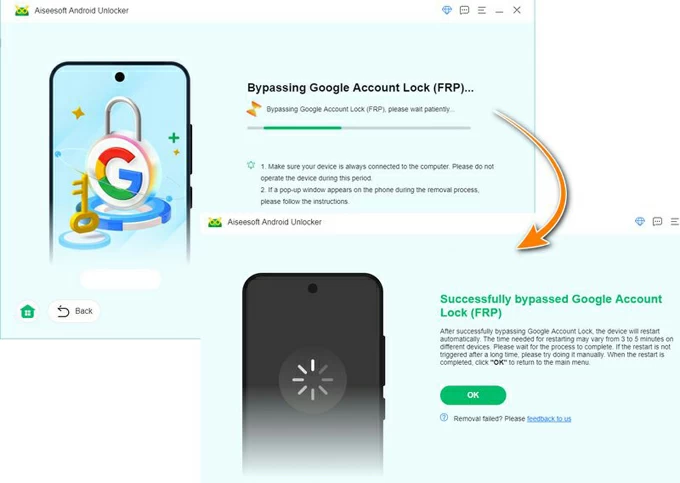
5.Click Bypass Now to start the Google lock removal process
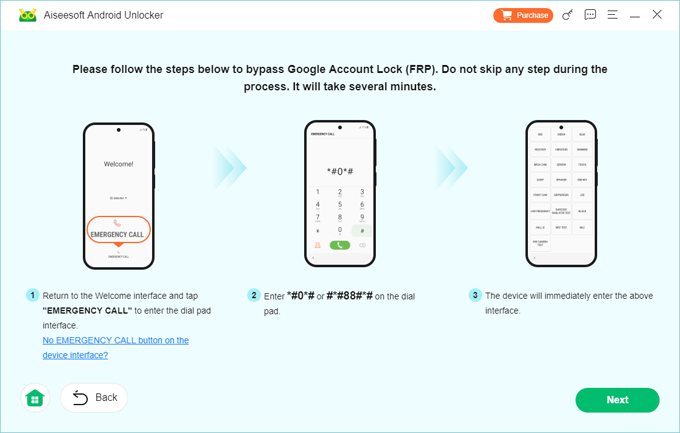
6.Wait until the process completes and the phone restarts
7.Set up your Motorola phone with a new Google account.
Important Notes
- No technical background required
- Supports most Motorola models and Android versions
- Does not require Google credentials
- Designed for legitimate device owners
This method is ideal if you want results without risk.
Method 2: Bypass Motorola Google Lock via Google Account Recovery (Official Path)
Before attempting technical solutions, it’s worth exploring Google’s own recovery mechanisms. While not always successful, this method works when account access—not device access—is the real issue.
If you remember partial account details (email, phone number, backup email), Google may allow you to regain access. Once recovered, the Google lock disappears naturally during setup.
How This Method Works
Google FRP doesn’t check ownership—it checks account validation. If you can log back into the original Google account, the lock becomes irrelevant.
Steps to Recover Google Account and Remove FRP:
1.On another device, visit Google Account Recovery
2.Enter the email associated with the Motorola phone
3.Complete identity verification steps
4.Reset your Google password
5.Wait 24–72 hours (security delay may apply)
6.Turn on the Motorola phone
7.Sign in using the recovered Google account
Important Notes
- Requires access to recovery email or phone number
- Time-consuming and not guaranteed
- Won’t work if the account was permanently deleted
This is the safest but slowest method, best suited for users who still have ties to the original Google account.
Method 3: Bypass Motorola Google Lock Using Built-In Accessibility Loopholes
Some Motorola models and Android versions expose system paths during initial setup—especially through accessibility services. These paths can sometimes allow limited system access to reset Google-related data.
However, Android security patches frequently close these loopholes. This method works inconsistently and requires careful execution.
How the Accessibility Method Works:
During setup, accessibility options may open apps like settings, browser, or keyboard configuration pages. From there, users attempt to interrupt the FRP check.
General Steps (May Vary by Model)
Start Motorola phone and reach Google verification screen
- Activate accessibility options
- Access text-to-speech or help settings
- Open external links or system menus
- Navigate to device reset or account settings
- Attempt to remove Google account and restart
Important Notes
- Highly Android-version dependent
- Often patched in newer Motorola phones
- Risk of endless loops or failed resets
This method is best considered experimental, not reliable.
Data Loss After Unlocking or System Crash (Extended Solution)
Bypassing Google Lock is often just the beginning. Many Motorola users experience unexpected data loss after unlocking, system crashes, or failed resets—especially if the device was locked for a long time.
A Common Scenario
A Motorola phone is FRP-locked after a reset. The user finally unlocks it—but realizes that:
- Photos are missing
- Contacts are gone
- Messages were wiped
- SD card data is unreadable
This happens because system resets rewrite Android partitions, making data inaccessible—even though it still physically exists.
The Practical Solution: Android Data Recovery
On the iDatapp website (https://idatapp.com), there are tools specifically designed to recover lost Android data after:
- FRP unlocking
- System crashes
- Accidental deletion
- Rooting failures
- SD card corruption
These tools scan both internal storage and SD cards, extracting recoverable files without overwriting existing data.
Why This Matters for Motorola Users?
Motorola phones don’t aggressively back up data unless manually configured. Once data is gone, recovery becomes time-sensitive. Using a dedicated recovery tool early dramatically increases success rates.
This combination—unlock first, recover later—is how many Motorola users fully restore their devices.
Frequently Asked Questions
Is bypassing Motorola Google Lock legal?
Yes, if you are the legitimate owner of the device. Bypassing FRP on stolen phones is illegal.
Does Google Lock removal erase data?
Most FRP removal methods involve a reset. Data recovery may still be possible afterward.
Can Motorola Google Lock be bypassed without a computer?
In rare cases, yes—but modern Android versions usually require a PC-based solution.
Does Android Unlocker support new Motorola models?
Yes. It supports a wide range of Motorola devices and Android versions.
Will Google Lock come back after bypassing?
No. Once properly removed, you can add a new Google account safely.
Summary
Motorola Google Lock is powerful, but not unbeatable. With the right method—especially professional unlocking software—you can regain access safely, efficiently, and without unnecessary risks.
 English
 Nederlands
 Tiếng Việt
 日本
日本 Español
 Português
 Deutsche
 Français
 Italiano
 Norsk
Norsk Suomalainen
 Svenska
 Dansk
Dansk Ελληνικά
 Türk
Türk русский
 हिंदी
हिंदी தமிழ்
தமிழ் Bahasa Melayu
 ไทย
ไทย 한국어
한국어 Română
 Polskie
 қазақ
қазақ Gaeilge
 繁體中文
繁體中文