
 iPhone Data Recovery
 iOS System Recovery
 iOS Backup & Restore
 iOS WhatsApp Transfer
 iOS FoneTrans
 MobieSync
 Android Data Recovery
 Broken Android Data Extraction
 Android Data Backup & Restore
 iPhone Unlocker
 Best Samsung Phone Unlock Tool
 Android Unlocker
 Win/Mac Data Recovery
 iDATAPP Screen Recorder
 2D&3D Video Converter
 Video Repair Software Ai
 AI Video Converter
 Ai Blu-ray Player
 How to Remove Samsung S26 Forgot PIN/Pattern Easily?
Forgot your Samsung S26 PIN or pattern? This guide explains three effective unlocking methods, step-by-step instructions, and additional solutions for Samsung data loss, helping users regain access safely and efficiently.

Forgetting the lock screen password on a flagship phone like the Samsung S26 can be more frustrating than most people expect. Modern Android security is designed to protect personal data, but that same protection can quickly turn into a barrier when you forget your PIN, pattern, or password.
The Samsung S26 series runs on the latest Android security framework, which means brute-force attempts are limited, automatic data protection is active, and recovery options are tightly integrated with Google and Samsung accounts. While this makes the phone safer against unauthorized access, it also means users often panic when they get locked out.
But here’s the good news: being locked out doesn’t automatically mean your data is lost or that a factory reset is your only option.
There are several reliable ways to regain access depending on your situation—whether you still have access to your Samsung account, previously enabled remote management features, or need a professional unlocking tool.
This guide explores three practical and proven methods to unlock a Samsung S26 if you forgot the PIN or pattern. Each solution focuses on real-world scenarios and gives you clear step-by-step instructions.
Guide List
- Method 1: Unlock Samsung S26 Using Samsung Unlocker (Professional & Fast)
- Method 2: Use Samsung Find My Mobile (Official Remote Unlock)
- Method 3: Unlock Samsung S26 Using Android Recovery Mode (Factory Reset)
- Samsung Data Loss After System Crash or Unlocking Problems
- Frequently Asked Questions
- Final Thoughts
Method 1: Unlock Samsung S26 Using Samsung Unlocker (Professional & Fast)
When the lock screen credentials are completely forgotten and account recovery options are unavailable, a dedicated unlocking tool is often the fastest solution. The Samsung Unlocker available on the iDATAPP website is specifically designed to remove screen locks from Samsung devices without requiring the original password.
This software works by placing the phone into a specialized recovery mode and applying a safe unlocking process compatible with Samsung firmware structures. It supports multiple lock types including PIN, pattern, password, fingerprint, and Face ID, making it a practical option for users who need a reliable unlock method.
Unlike manual recovery methods, this approach focuses on simplicity and speed, making it especially useful for users with limited technical experience.
Steps to Unlock Samsung S26 with Samsung Unlocker:
1.Download and install Samsung Unlocker, Launch the program on your computer.
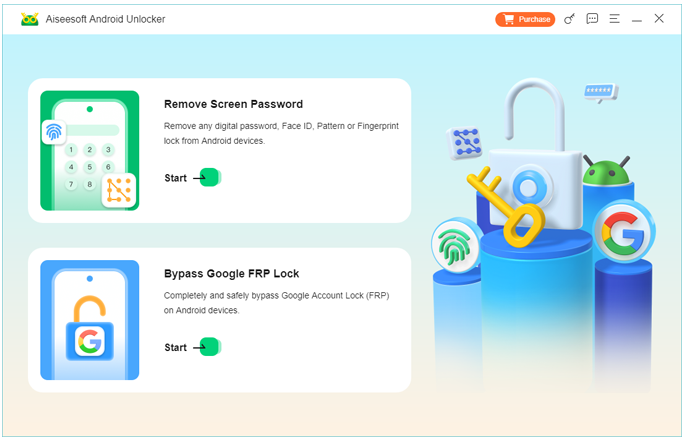
2.Select Remove Screen Password from the main interface.
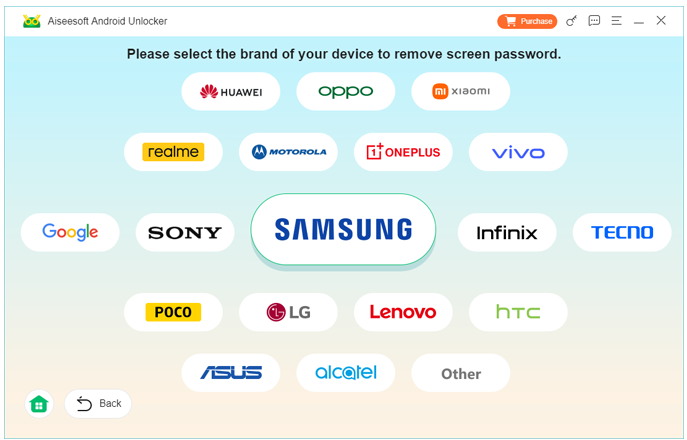
3.Connect your Samsung S26 to the computer using a USB cable and select your mobile model.
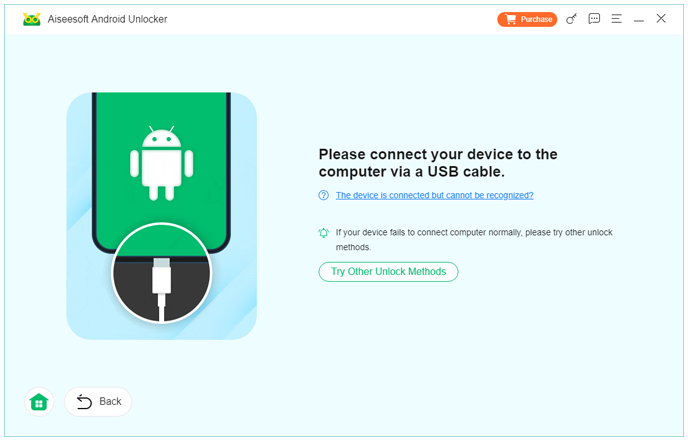
4.The software will detect the device automatically.
5.Follow the on-screen instructions to place the phone into Download Mode.
6.Confirm the unlocking process.
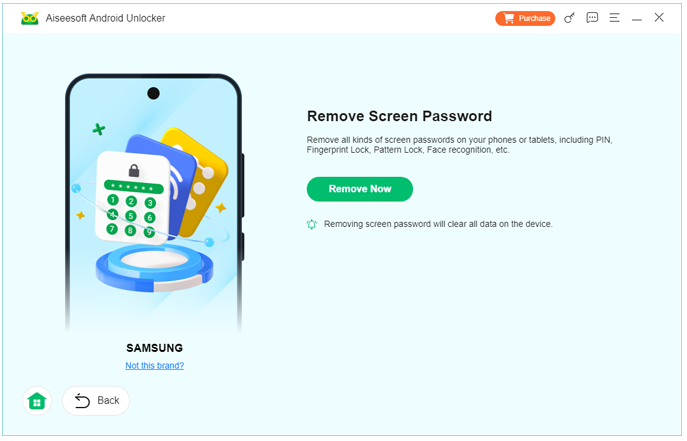
7.The program will remove the screen lock and restart your device.
Important Tips
- Ensure your device battery is above 50% before unlocking.
- Use the original USB cable to avoid connection interruptions.
- Do not disconnect the phone while the process is running.
This method is ideal if you want a quick and straightforward solution without relying on account credentials.
Method 2: Use Samsung Find My Mobile (Official Remote Unlock)
If you previously signed in to a Samsung account and enabled remote device management, Samsung Find My Mobile offers a convenient way to unlock the phone remotely.
This cloud-based service allows Samsung users to locate devices, lock them, wipe data, or even unlock the screen remotely. Since the feature communicates directly with Samsung servers, it can bypass the lock screen as long as the device is connected to the internet.
For many Samsung users, this is actually the safest and easiest official solution, because it doesn’t require additional software or complex recovery procedures.
Steps to Unlock Using Samsung Find My Mobile:
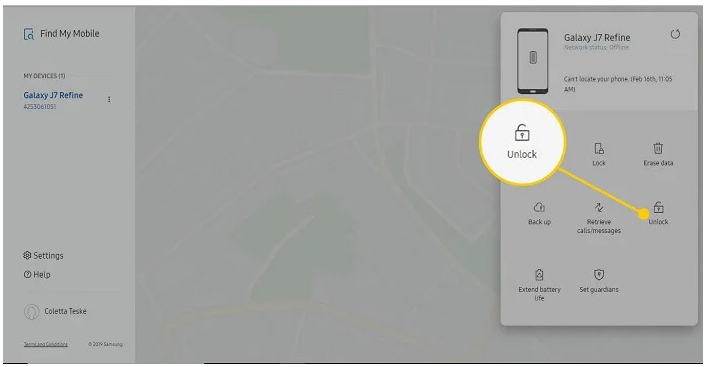
- On a computer or another device, open the Samsung Find My Mobile website.
- Log in using the Samsung account associated with your Samsung S26.
- Once logged in, locate your phone in the device list.
- Select the Unlock option.
- Enter your Samsung account password to confirm.
- Wait for the remote command to reach your device.
- The screen lock will be removed automatically.
Important Notes
- The phone must be powered on and connected to the internet.
- A Samsung account must have been registered before the lock occurred.
- Remote unlock must have been enabled in device settings.
If these requirements are met, unlocking usually takes less than one minute.
Method 3: Unlock Samsung S26 Using Android Recovery Mode (Factory Reset)
When no unlocking tools or accounts are available, using Recovery Mode to perform a factory reset becomes the final option. This method removes all device data but restores the phone to its original system state, including removing the forgotten screen lock.
Although this method is simple, it should only be used when data loss is acceptable or when backups already exist.
Steps to Unlock Using Recovery Mode
- Turn off your Samsung S26 completely.
- Press and hold the Power + Volume Up buttons simultaneously.
- Release the buttons once the Samsung logo appears.
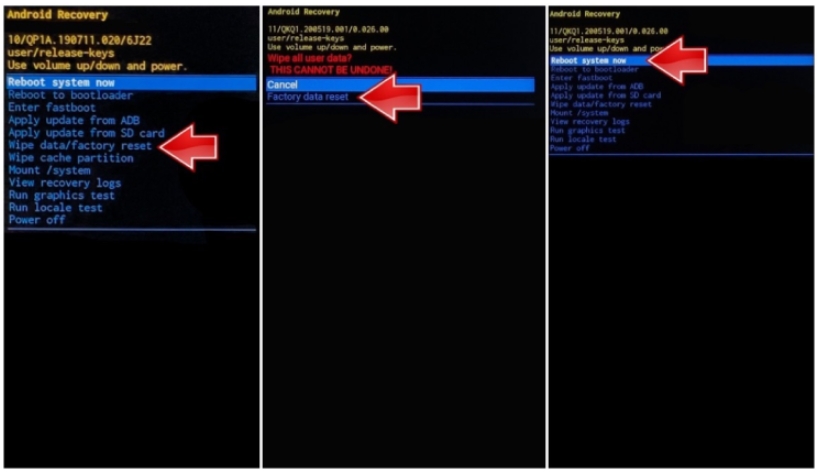
- The device will enter Android Recovery Mode.
- Use the volume buttons to navigate to Wipe Data/Factory Reset.
- Press the Power button to confirm.
- Select Yes – Delete All User Data.
- Wait for the system reset to complete.
- Select Reboot System Now.
- Once the phone restarts, the screen lock will be removed and the device can be set up again.
Important Considerations
- All personal data will be erased.
- You may still need to verify your Google account (FRP protection) after reset.
Samsung Data Loss After System Crash or Unlocking Problems
Many Samsung users encounter another frustrating problem after dealing with screen lock issues: data loss caused by system crashes, unlocking failures, or accidental resets.
For example, imagine this situation:
You attempted several unlocking methods on your Samsung S26. Eventually, you had to perform a factory reset through recovery mode. The phone now works again—but all your important files are gone.
Photos from family events, work contacts, WhatsApp messages, and videos stored locally may suddenly disappear. This happens more often than people realize because Android stores a large portion of personal data locally on the device memory.
Fortunately, professional recovery tools can scan Samsung storage sectors and retrieve lost files even after system problems.
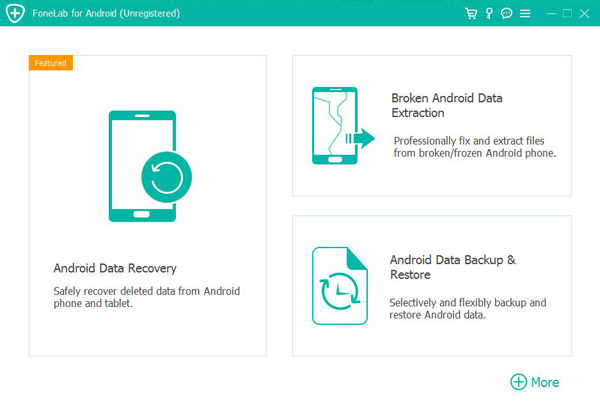
One solution designed for this scenario is the Android Data Recovery tool available at idatapp.com.
This software is designed to recover lost data from Android devices including Samsung phones affected by:
- System crashes
- Rooting errors
- Accidental deletion
- Failed updates
- Virus attacks
- Factory reset data loss
- Device malfunctions
Unlike simple backup restoration tools, Android Data Recovery performs a deep scan of device storage, identifying recoverable files such as:
- Photos and videos
- Contacts and call history
- SMS and messaging data
- WhatsApp conversations
- Documents and attachments
Typical Data Recovery Workflow
- Install the Android Data Recovery software on a computer.
- Connect the Samsung S26 via USB.
- Enable USB debugging mode.
- Select the types of files to recover.
- Start a deep scan of the device storage.
- Preview recoverable files before restoring them.
- Export recovered data to your computer safely.
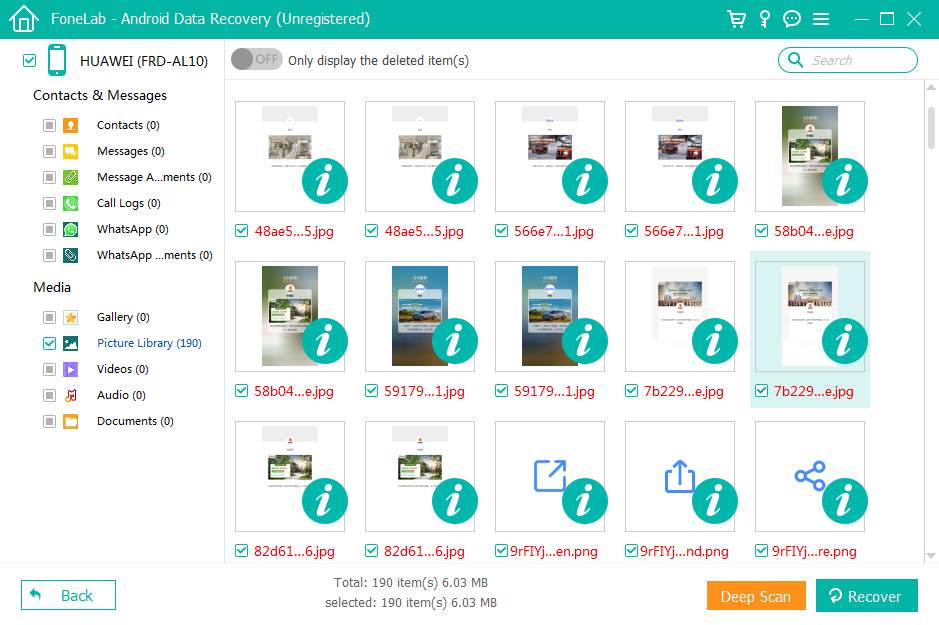
The ability to preview files before recovery is especially useful because it prevents unnecessary data restoration and allows users to recover only the files they actually need.
Many users assume that factory resets permanently erase data, but in reality, the system often only removes file indexes. Until new data overwrites the storage sectors, recovery tools can still retrieve a large portion of lost content.
Because of this, it’s always recommended to stop using the device immediately after data loss and perform recovery as soon as possible.
This approach significantly improves the chances of successful recovery.
Frequently Asked Questions
Can I unlock Samsung S26 without losing data?
Yes, it depends on the method. Using Samsung Find My Mobile or a professional unlocking tool may remove the screen lock without deleting data. However, factory reset will erase everything.
What should I do if Samsung Find My Mobile doesn’t detect my phone?
Make sure the device is powered on, connected to the internet, and logged into the same Samsung account. If the feature was not enabled before the lock, it will not work.
Will Google FRP lock appear after a factory reset?
Yes, if your Samsung S26 had a Google account linked before the reset, you must verify the account during setup due to Factory Reset Protection (FRP).
Is it safe to use Samsung unlocking software?
If the software comes from a trusted provider and supports Samsung firmware structures, it can safely remove the lock screen without harming the device.
How can I avoid being locked out again?
Use features like fingerprint unlocking, Samsung account recovery options, and secure password managers. Also consider enabling Samsung Find My Mobile for future remote unlock capability.
Final Thoughts
Forgetting the lock screen PIN or pattern on a Samsung S26 can feel like a disaster, but in reality there are several reliable solutions. From official Samsung services to professional unlocking tools and system recovery options, users have multiple ways to regain access.
The key is choosing the method that matches your situation—whether you prioritize data preservation, convenience, or guaranteed unlocking.
 English
 Nederlands
 Tiếng Việt
 日本
日本 Español
 Português
 Deutsche
 Français
 Italiano
 Norsk
Norsk Suomalainen
 Svenska
 Dansk
Dansk Ελληνικά
 Türk
Türk русский
 हिंदी
हिंदी தமிழ்
தமிழ் Bahasa Melayu
 ไทย
ไทย 한국어
한국어 Română
 Polskie
 қазақ
қазақ Gaeilge
 繁體中文
繁體中文