
 iPhone Data Recovery
 iOS System Recovery
 iOS Backup & Restore
 iOS WhatsApp Transfer
 iOS FoneTrans
 MobieSync
 Android Data Recovery
 Broken Android Data Extraction
 Android Data Backup & Restore
 iPhone Unlocker
 Best Samsung Phone Unlock Tool
 Android Unlocker
 Win/Mac Data Recovery
 iDATAPP Screen Recorder
 2D&3D Video Converter
 Video Repair Software Ai
 AI Video Converter
 Ai Blu-ray Player
 How to Unlock Samsung S25 Ultra Without Password?
Forgot the lock screen password on your Samsung Galaxy S25 or S25 Ultra? This guide explains three reliable unlocking methods, including a no-password solution, plus tips to recover data if your device becomes inaccessible.

Samsung’s Samsung Electronics Galaxy S25 series is packed with AI features, powerful cameras, and enhanced security. But those same security features can become a serious obstacle if you forget your PIN, pattern, or password.
A surprising number of users get locked out after changing their passcode, letting a child play with the phone, or restarting the device and forgetting the unlock method they rarely use.
If you’re searching for how to unlock Samsung Galaxy S25 Ultra, you likely want one of two outcomes:
Regain access as quickly as possible.
Avoid losing important data such as photos, contacts, and messages.
The challenge is that Samsung’s protection systems—especially Factory Reset Protection (FRP)—make unauthorized access extremely difficult. That’s excellent for security, but frustrating when you are the legitimate owner.
This article covers three proven ways to unlock a Samsung Galaxy S25, S25+, or S25 Ultra. One method uses iDATAPP Samsung Unlocker, while the other two rely on official Samsung and Android tools.
Guide List
- Why People Get Locked Out of Samsung Galaxy S25?
- Method 1: Unlock Samsung Galaxy S25 with iDATAPP Samsung Unlocker (Fastest Solution)
- Method 2: Unlock Samsung Galaxy S25 Using Samsung SmartThings Find
- Method 3: Factory Reset Samsung Galaxy S25 via Recovery Mode
- Which Samsung Galaxy S25 Unlock Method Should You Choose?
- Recover Lost Data from Samsung Galaxy S25 After Unlocking
- What iDATAPP Android Data Recovery Can Restore
- Real-World Example
- How to Recover Data from Samsung Galaxy S25
- Why Samsung Users Need a Recovery Plan?
- Frequently Asked Questions
Why People Get Locked Out of Samsung Galaxy S25?
Even experienced users forget their screen lock. Common situations include:
- Changing the PIN and forgetting it.
- Using fingerprint unlock for months and forgetting the backup password.
- Purchasing a second-hand phone still tied to a previous account.
- Entering the wrong pattern too many times.
- Children accidentally changing security settings.
- Software glitches after a One UI update.
Fortunately, there are several ways to regain access.
Method 1: Unlock Samsung Galaxy S25 with iDATAPP Samsung Unlocker (Fastest Solution)
If you need a straightforward solution with minimal technical work, iDATAPP Samsung Unlocker is the easiest option.
The software is designed specifically for Samsung devices and can remove:
- PIN
- Password
- Pattern
- Fingerprint lock
- Face lock
- Google FRP lock
Unlike many generic Android tools, it provides a guided process tailored for Samsung models, including the Galaxy S25 series.
Best For
- Forgotten lock screen credentials
- Disabled devices
- Second-hand phones with FRP lock
- Users with little technical experience
How to Unlock Samsung Galaxy S25 Using iDATAPP:
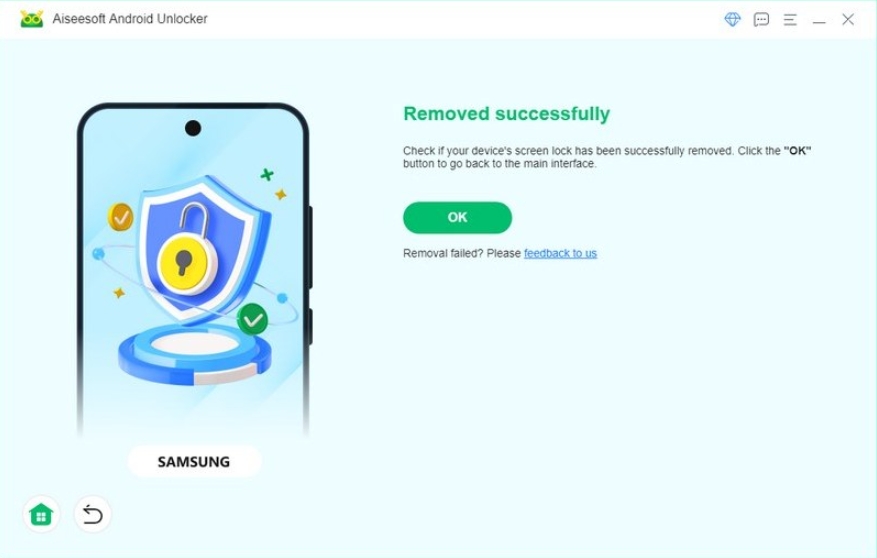
1.Download and install iDATAPP Samsung Unlocker on your computer.
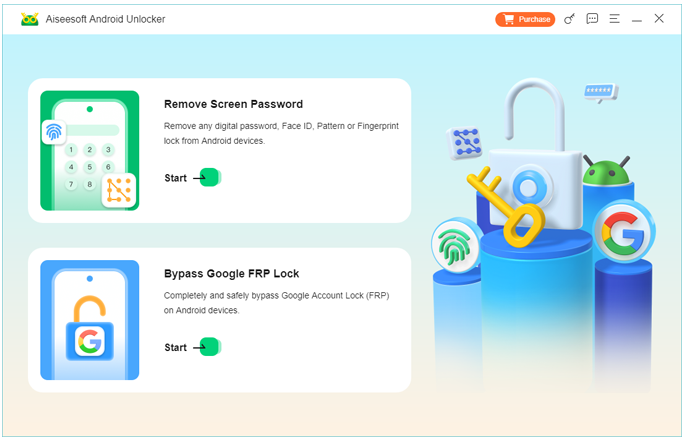
2.Launch the program and choose Remove Screen Password.
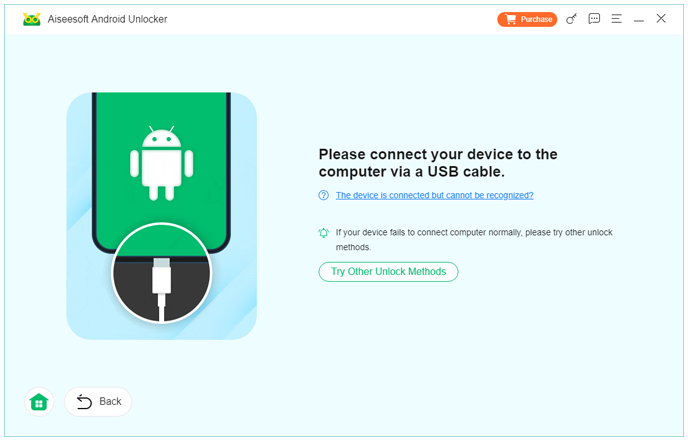
3.Connect your Galaxy S25 with a USB cable.
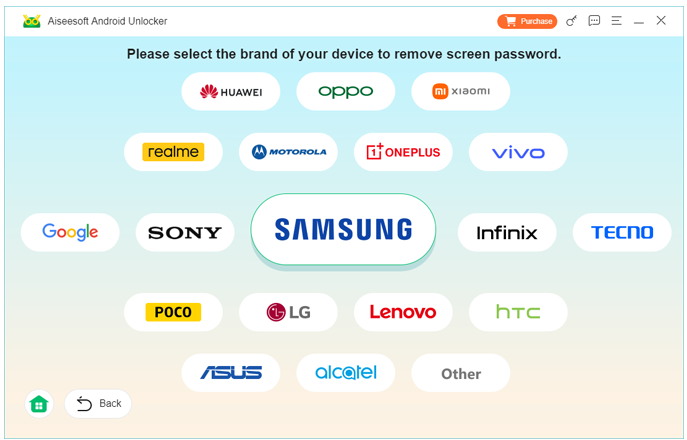
4.Select your device information.
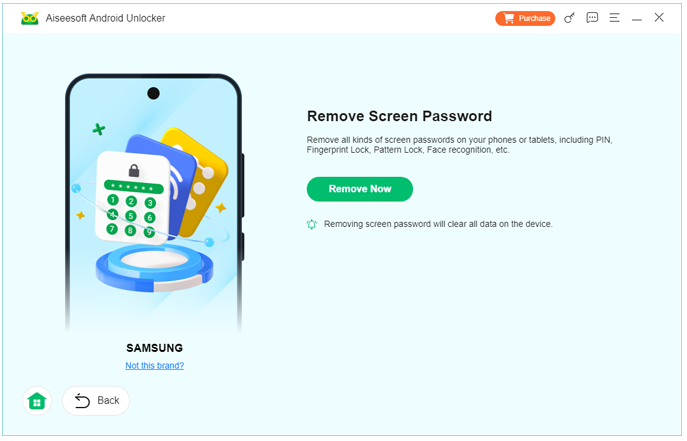
5.Click Remove Now.
6.Wait for the process to complete.
Important Details
- Some unlocking modes may erase data.
- FRP removal is available for supported Samsung firmware versions.
- Stable USB connection is essential.
Why This Method Stands Out?
Most users want a solution that simply works. This tool combines Samsung-specific compatibility with a clean interface, making it ideal when speed matters.
Method 2: Unlock Samsung Galaxy S25 Using Samsung SmartThings Find
Samsung SmartThings Find (which replaced older Find My Mobile functions) can help you remotely manage your device if you previously enabled remote features.
This method works only when:
- The phone is connected to the internet.
- Your Samsung account is signed in.
- Remote controls were enabled before the lockout.
How to Use SmartThings Find
- Visit Samsung SmartThings Find in your browser.
- Sign in with your Samsung account.
- Select your locked Galaxy S25.
- Use available management options.
- Follow prompts to verify your identity.
Important Details
Samsung has changed remote unlock capabilities over time, and feature availability can vary by device and region. If the remote unlock option is unavailable, proceed to another method.
Why This Method Is Worth Trying
It’s official, secure, and doesn’t require installing software on your PC.
Method 3: Factory Reset Samsung Galaxy S25 via Recovery Mode
If all else fails, a factory reset removes the screen lock by erasing the phone.
Warning
This deletes all local data and may trigger Google FRP, requiring the previously synced Google account credentials.
Steps to Factory Reset Galaxy S25
1.Power off the device.
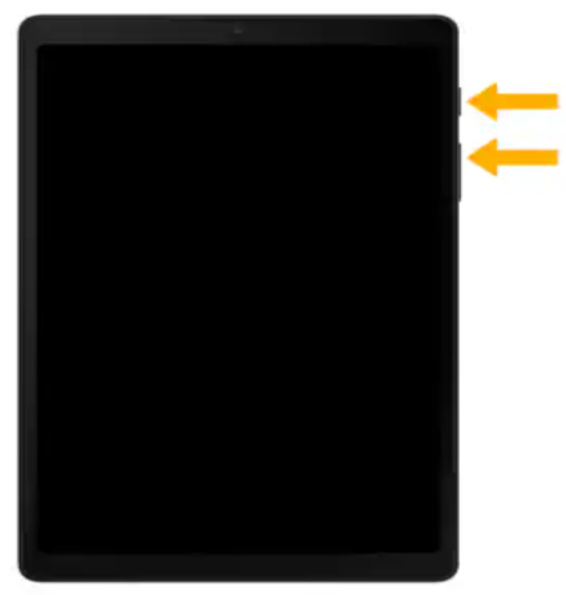
2.Connect it to a computer via USB if required.
3.Press and hold: Volume Up + Power
4.Release when the Samsung logo appears.
5.In Recovery Mode, select Wipe data/factory reset.
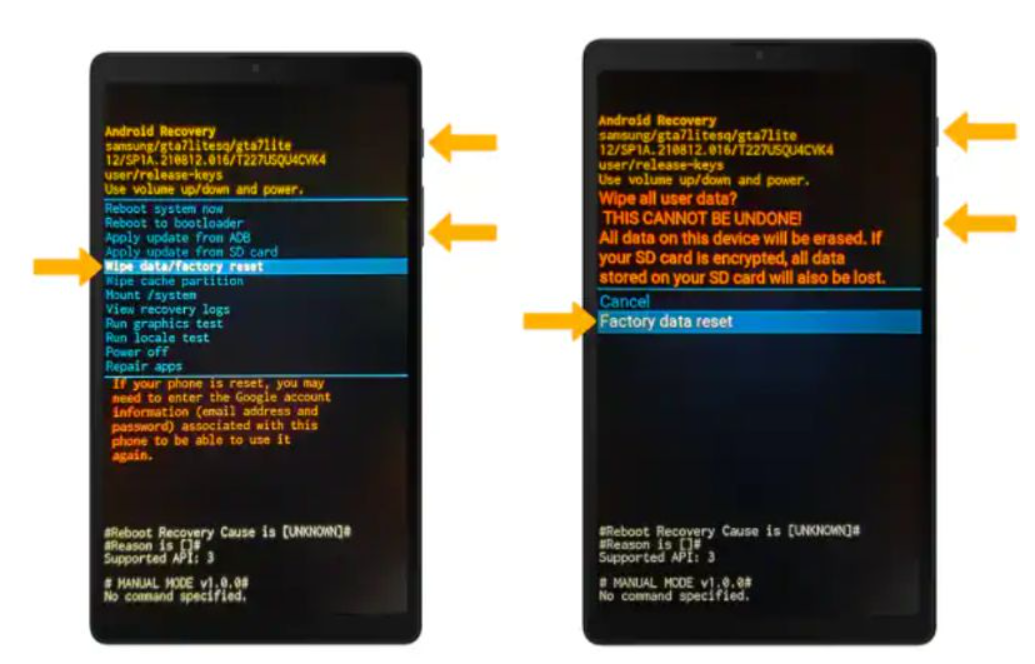
6.Confirm with Factory data reset.
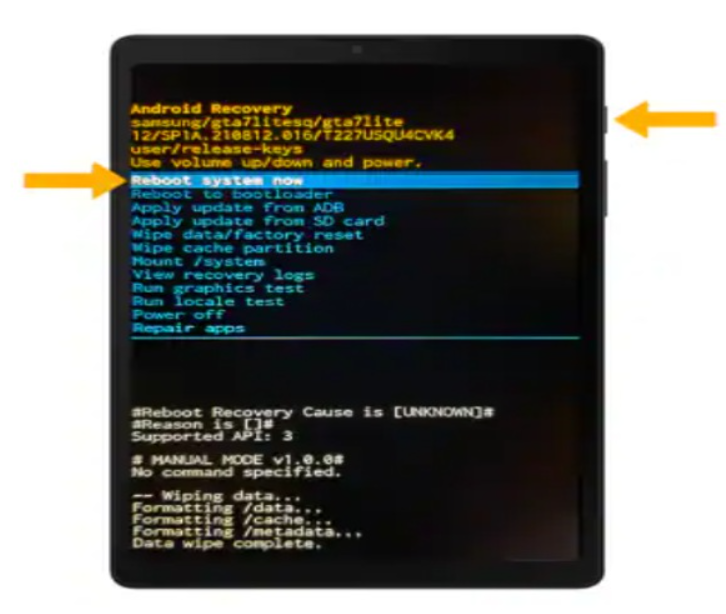
7.Select Reboot system now.
Important Details
After reset, sign in with the original Google account to complete setup.
When to Use This Method
Use this only if you know the Google account credentials associated with the device.
Which Samsung Galaxy S25 Unlock Method Should You Choose?
| Situation | Recommended Method |
|---|---|
| Forgot PIN/password | iDATAPP Samsung Unlocker |
| Samsung account remote features enabled | SmartThings Find |
| No other options available | Recovery Mode factory reset |
| FRP lock after reset | iDATAPP Samsung Unlocker |
Recover Lost Data from Samsung Galaxy S25 After Unlocking
Many users successfully unlock their phones only to discover that important photos, contacts, or WhatsApp messages are gone.
This often happens when:
- Performing a factory reset
- Failed software updates
- Accidental deletion before lockout
- Storage corruption
- Water damage or system crashes
In these cases, iDATAPP Android Data Recovery can help restore deleted or inaccessible files from Samsung devices.
What iDATAPP Android Data Recovery Can Restore
The software supports recovery of:
- Photos and videos
- Contacts
- SMS messages
- WhatsApp chats and attachments
- Documents
- Call history
- Audio files
It works with Samsung phones and tablets, including the Galaxy S25 series.
Real-World Example
Imagine this common scenario:
You forgot your Galaxy S25 Ultra PIN and performed a factory reset. The phone unlocks, but your recent vacation photos were never backed up to Google Photos or Samsung Electronics Cloud.
By connecting the device to iDATAPP Android Data Recovery, you can scan internal storage and recover many deleted images and videos.
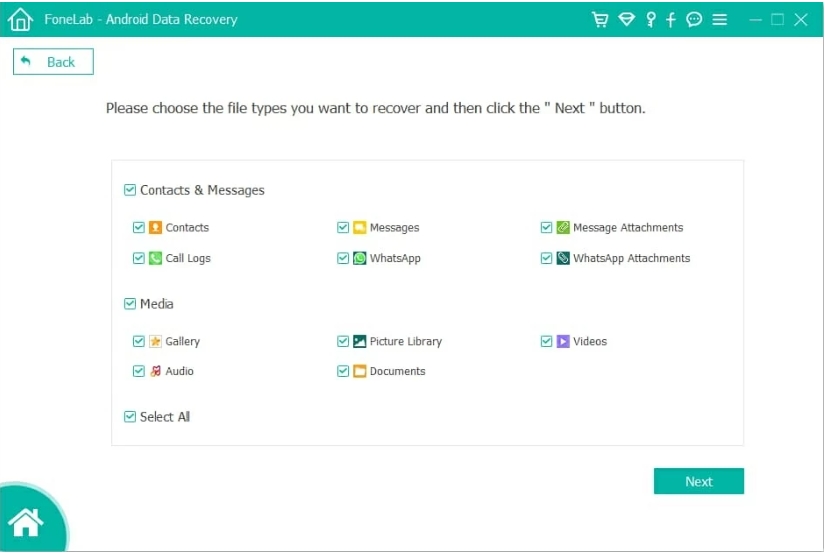
How to Recover Data from Samsung Galaxy S25
- Install iDATAPP Android Data Recovery.
- Open the program.
- Connect your Samsung phone.
- Enable USB debugging if possible.
- Select data types to scan.
- Preview recoverable files.
- Save them to your computer.
Why Samsung Users Need a Recovery Plan?
Unlocking is only part of the story. Data loss often follows emergency troubleshooting steps, especially factory resets.
Keeping a dedicated recovery tool available can prevent a stressful situation from becoming a permanent loss.
Frequently Asked Questions
Can I unlock Samsung Galaxy S25 without losing data?
Yes, in some situations. SmartThings Find may preserve data, and specialized software can offer additional options depending on the lock type.
Does factory reset remove the password?
Yes. It removes the lock screen, but all stored data is erased.
What is FRP on Samsung phones?
Factory Reset Protection prevents unauthorized use after a reset by requiring the previously synced Google account credentials.
Can I unlock a second-hand Samsung Galaxy S25?
Yes, but if FRP is enabled, you’ll need the prior owner’s credentials or a supported FRP removal solution.
What should I do if I lost data after unlocking?
Use iDATAPP Android Data Recovery to scan and recover deleted files.
Conclusion
Forgetting the password on your Samsung Galaxy S25 or S25 Ultra can be frustrating, but it doesn’t mean your phone is unusable.
The three most effective ways to unlock the device are:
- iDATAPP Samsung Unlocker
- Samsung SmartThings Find
- Recovery Mode factory reset
If you lose data during the process, iDATAPP Android Data Recovery provides a practical way to recover photos, contacts, and messages.
With the right approach, you can regain access to your Galaxy S25 and protect the information that matters most.
 English
 Nederlands
 Tiếng Việt
 日本
日本 Español
 Português
 Deutsche
 Français
 Italiano
 Norsk
Norsk Suomalainen
 Svenska
 Dansk
Dansk Ελληνικά
 Türk
Türk русский
 हिंदी
हिंदी தமிழ்
தமிழ் Bahasa Melayu
 ไทย
ไทย 한국어
한국어 Română
 Polskie
 қазақ
қазақ Gaeilge
 繁體中文
繁體中文