
 iPhone Data Recovery
 iOS System Recovery
 iOS Backup & Restore
 iOS WhatsApp Transfer
 iOS FoneTrans
 MobieSync
 Android Data Recovery
 Broken Android Data Extraction
 Android Data Backup & Restore
 iPhone Unlocker
 Best Samsung Phone Unlock Tool
 Android Unlocker
 Win/Mac Data Recovery
 iDATAPP Screen Recorder
 2D&3D Video Converter
 Video Repair Software Ai
 AI Video Converter
 Ai Blu-ray Player
 How to Unlock a Cracked iPhone/iPad and Access It Again?
Best guide to unlock a cracked iPhone with unresponsive screens using practical methods, including iDatapp iPhone Unlocker, iCloud erase, and recovery mode—plus data protection tips.
How to Unlock iPhone/iPad with broken screen and Access It Again?
A cracked iPhone screen is more than a cosmetic problem. When the glass is shattered or the touch layer stops responding, even a correct passcode becomes useless. You may know the password by heart, yet the phone feels permanently locked. For many users, this is the exact moment panic sets in—photos trapped inside, messages unreachable, work apps frozen behind an unresponsive display.

This article doesn’t rush straight into tools. First, we break down why a cracked iPhone becomes locked, then examine what still works internally, and finally walk through three practical unlocking methods—from system-level solutions to professional unlocking software from iDatapp. The goal is simple: regain access safely, legally, and efficiently.
Guide List
- Why a Cracked iPhone Becomes “Locked” Even When You Know the Password
- What Still Works on a Cracked iPhone (and What Doesn’t)
- Method 1: Unlock broken screen iPhone/iPad Using iDatapp iPhone Unlocker (Recommended)
- Method 2: Unlock a Cracked iPhone Using iCloud Remote Erase
- Method 3: Unlock a Cracked iPhone Using iTunes / Finder Recovery Mode
- Data Loss After System Crash on Cracked Devices
- Frequently Asked Questions
Why a Cracked iPhone Becomes “Locked” Even When You Know the Password
Modern iPhones rely on more than just glass. Beneath the screen is a multi-layer structure: display panel, digitizer, and security interface. When the digitizer fails, iOS still demands input—but can’t receive it.
Common lock scenarios after screen damage include:
- Touch not registering at all
- Ghost touches entering the wrong passcode
- Face ID disabled due to angle or sensor damage
- Touch ID unusable because you can’t reach the Home button properly
- iPhone disabled after multiple incorrect attempts
The system itself is intact. The problem is human-device interaction, not data corruption. That distinction is important—because it determines which unlocking methods still work.
What Still Works on a Cracked iPhone (and What Doesn’t)
Before choosing a solution, understand your phone’s condition:
Usually still functional
- Internal storage and data
- iOS system
- Lightning/USB-C port
- iCloud communication
- Computer trust pairing (in some cases)
Usually compromised
- Touch input
- Face ID alignment
- On-screen passcode entry
- Emergency accessibility gestures
This means unlocking often requires external control, remote authorization, or system-level removal of the lock.
Method 1: Unlock broken screen iPhone/iPad Using iDatapp iPhone Unlocker (Recommended)
Best for:
Completely unresponsive screens, Face ID failures, forgotten passcodes, or disabled iPhones.
When physical interaction fails entirely, the most reliable path is controlled system unlocking via computer software. iDatapp iPhone Unlocker is designed specifically for scenarios where the screen cannot be used at all—including cracked, shattered, or non-responsive displays.
Unlike generic reset approaches, this method communicates directly with the iOS system through recovery protocols. It removes the screen lock cleanly and restores access without relying on touch input, Face ID, or Siri.
This solution is particularly effective because it mirrors Apple’s internal unlocking logic while automating the process for non-technical users.
Detailed Steps (Based on the Latest Official Usage Guide)
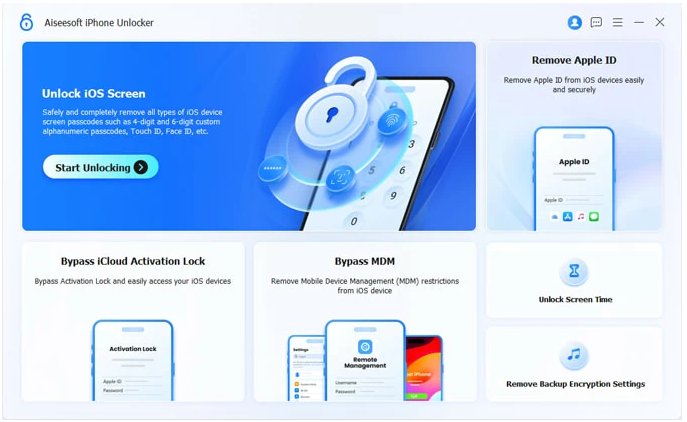
1.Download and install iDatapp iPhone Unlocker, launch the program and select “Unlock iOS Screen”.
2.Connect your cracked iPhone to the computer using a cable

3.Follow on-screen instructions to enter Recovery Mode
(Button combinations vary by iPhone model)
4.The software automatically detects your device model and iOS version
5.Confirm firmware details and click Start Unlock

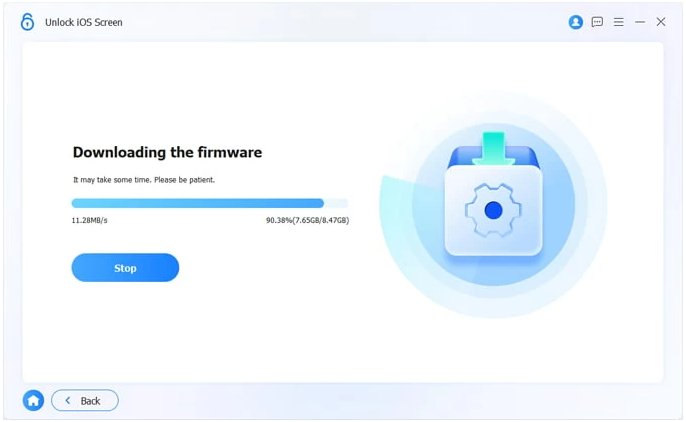
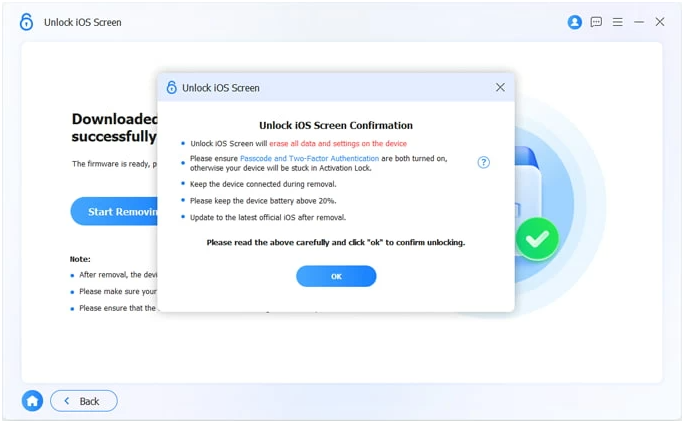
6.Wait while the tool removes the lock and restores access

Important Notes
- This process erases the lock screen and resets the device
- Apple ID credentials are required after unlocking
- Works even when the screen is completely black or frozen
Method 2: Unlock a Cracked iPhone Using iCloud Remote Erase
Best for:
iPhones with “Find My iPhone” enabled and stable internet access.
When the screen can’t accept input but the phone is still online, iCloud offers a remote way to remove the lock. This approach doesn’t require touching the phone at all—it relies on Apple’s cloud authorization instead.
The logic is simple: once the device is erased remotely, the lock screen is removed along with it. After rebooting, you can set the iPhone up again.
This method is effective but conditional. It only works if:
- “Find My” was enabled before the screen cracked
- You remember the Apple ID and password
- The iPhone is connected to Wi-Fi or cellular data
Step-by-Step Instructions
- Visit iCloud.com on a computer or another device
- Sign in with the Apple ID linked to the cracked iPhone
- Go to Find My iPhone
- Select "Erase This Device" from the device list
- Click Erase
- Confirm the action using Apple ID verification
- Wait for the device to reset remotely
Notes
- All local data will be erased
- Apple ID activation lock remains for security
- Not usable if the device is offline
Method 3: Unlock a Cracked iPhone Using iTunes / Finder Recovery Mode
Best for:
Users who previously synced the iPhone with a computer or trust pairing still exists.
This is a traditional Apple-supported recovery method. By placing the iPhone into Recovery Mode and restoring it through iTunes (Windows) or Finder (macOS), the lock screen can be removed without screen interaction.
However, this approach is more fragile. If the device asks for confirmation on the cracked screen—or if trust pairing was never established—it may fail.
Step-by-Step Instructions
1.Connect the iPhone to a trusted computer
2.Force the iPhone into Recovery Mode
3.Open iTunes or Finder
4.When prompted, choose Restore
5.Wait for iOS to reinstall
6.Set up the device after reboot
Important Notes
- Requires Apple ID login after restore
- Data is erased unless you have a backup
- Less reliable than dedicated unlocking software
Data Loss After System Crash on Cracked Devices
Cracked screens don’t just lock phones—they often trigger system instability. Sudden reboots, update failures, and storage corruption are common, especially after impact damage.
One frequent situation:
- The iPhone crashes during an iOS update, reboots into recovery mode, and data becomes inaccessible—even after unlocking.
This is where data recovery becomes more urgent than unlocking.
Recommended Solution: iDatapp iPhone Data Recovery
When iOS crashes or data disappears after unlocking or restoring, iDatapp iPhone Data Recovery helps extract photos, messages, contacts, WhatsApp data, and more—even from devices stuck in abnormal states.
Why this matters for cracked iPhones
- Screen damage increases system error rates
- Unlocking often requires restoration
- Restoration without backup = data loss risk
Using professional recovery tools from the same ecosystem ensures compatibility and avoids further damage.
Frequently Asked Questions
Can I unlock a cracked iPhone without losing data?
In most cases, no. Screen locks are deeply integrated with iOS security. Unlocking usually requires erasing the device unless you already have a trusted backup.
Does a cracked screen disable Face ID permanently?
Not permanently, but alignment issues or sensor damage often disable Face ID until the screen is repaired.
Is it safe to unlock an iPhone using software?
Yes—if the software is legitimate and system-level, like iDatapp iPhone Unlocker. Avoid unknown tools that bypass Apple ID security.
What if the screen is completely black?
Computer-based unlocking methods still work because they don’t rely on visual or touch interaction.
Should I repair the screen before unlocking?
If the phone is already locked or disabled, unlocking first is often faster and more cost-effective than immediate screen repair.
Conclusion
A cracked iPhone doesn’t mean permanent lockout. By understanding how iOS security works beneath the glass, you can choose the right unlocking method—whether through iDatapp iPhone Unlocker, iCloud, or system recovery—and regain access with confidence.
 English
 Nederlands
 Tiếng Việt
 日本
日本 Español
 Português
 Deutsche
 Français
 Italiano
 Norsk
Norsk Suomalainen
 Svenska
 Dansk
Dansk Ελληνικά
 Türk
Türk русский
 हिंदी
हिंदी தமிழ்
தமிழ் Bahasa Melayu
 ไทย
ไทย 한국어
한국어 Română
 Polskie
 қазақ
қазақ Gaeilge
 繁體中文
繁體中文