
 iPhone Data Recovery
 iOS System Recovery
 iOS Backup & Restore
 iOS WhatsApp Transfer
 iOS FoneTrans
 MobieSync
 Android Data Recovery
 Broken Android Data Extraction
 Android Data Backup & Restore
 iPhone Unlocker
 Best Samsung Phone Unlock Tool
 Android Unlocker
 Win/Mac Data Recovery
 iDATAPP Screen Recorder
 2D&3D Video Converter
 AI Video Converter
 Ai Blu-ray Player
  Video Repair Software Ai
iDATAPP Video Repairer can help fix/restore videos with lost or corrupted data.
Vivo FRP Unlock Tool| Easily Bypass FRP Lock On Vivo Phone
Vivo FRP lock protects devices after factory resets. Users can regain access through Google account recovery or iDATAPP Android Unlocker, while proactive backups help prevent future data-related problems.
How to Unlock FRP From Vivo Phone?
If you have reset a Vivo phone and suddenly find yourself stuck on the Google account verification screen, you are dealing with FRP (Factory Reset Protection). Many Vivo users encounter this issue after performing a factory reset, purchasing a second-hand device, forgetting their Google account credentials, or resetting a phone that has been inactive for a long time.
The good news is that FRP lock is not a hardware problem. In most cases, it can be removed safely when you use the correct approach. In this guide, we will explain what Vivo FRP lock is, why it appears, and the most effective ways to unlock FRP from a Vivo phone.
Guide List
- Understanding Vivo FRP Lock Before You Start
- Method 1: Unlock Vivo FRP Using iDATAPP Android Unlocker
- Method 2: Recover the Original Google Account and Complete Verification
- Why Vivo Phones Commonly Trigger FRP Lock
- Vivo Data Loss After a System Crash
- Tips to Prevent FRP Lock in the Future
- Frequently Asked Questions
Understanding Vivo FRP Lock Before You Start
FRP, or Factory Reset Protection, is a security feature developed by Google and integrated into Android devices, including Vivo smartphones. Once a Google account is added to a device, FRP automatically activates.
When a factory reset is performed without first removing the Google account, the phone will request the previously synced Google account information during setup. This prevents unauthorized access if the device is lost or stolen.
While FRP improves security, it can also create problems for legitimate owners who:
- Forgot their Google account password
- Purchased a used Vivo phone with FRP enabled
- Cannot access the recovery email or phone number
- Reset the device accidentally
- Inherited a phone from a family member
Fortunately, there are practical solutions available.
Method 1: Unlock Vivo FRP Using iDATAPP Android Unlocker
For users who need a straightforward solution, iDATAPP Android Unlocker provides a dedicated FRP removal function designed to help regain access to Android devices, including many Vivo models. Unlike complicated manual workarounds, the software guides users through the process with clear instructions and device-specific options.
The software is especially useful when you cannot remember the previously synchronized Google account or when standard verification methods are unavailable. Because the process is automated, users with limited technical experience can complete the operation without navigating complex Android settings or hidden menus.

Detailed Steps
Step 1: Download and install iDATAPP Android Unlocker on your computer.
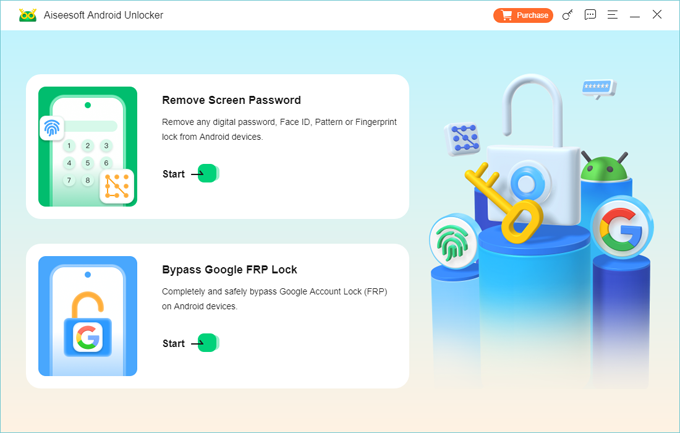
Step 2: Launch the program and select the Bypass Google FRP Lock feature.
Step 3: Connect your Vivo phone to the computer using a reliable USB cable.
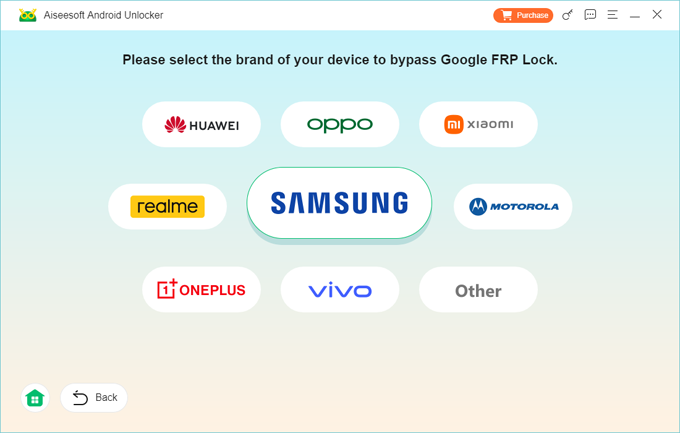
Step 4: Choose the appropriate Android version or Vivo device information when prompted and click Bypass Now.
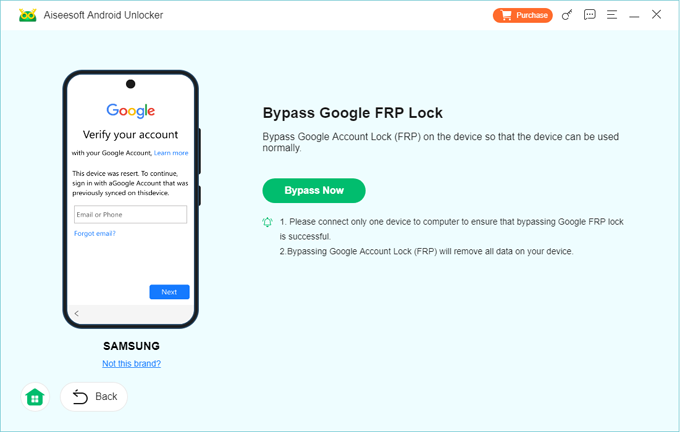
Step 5: Follow the on-screen instructions provided by the software.
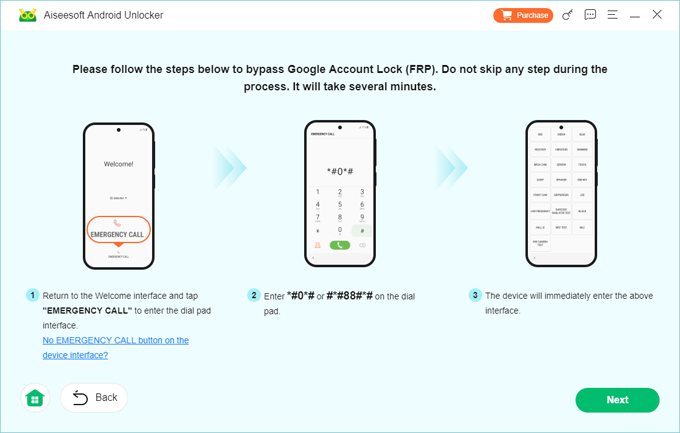
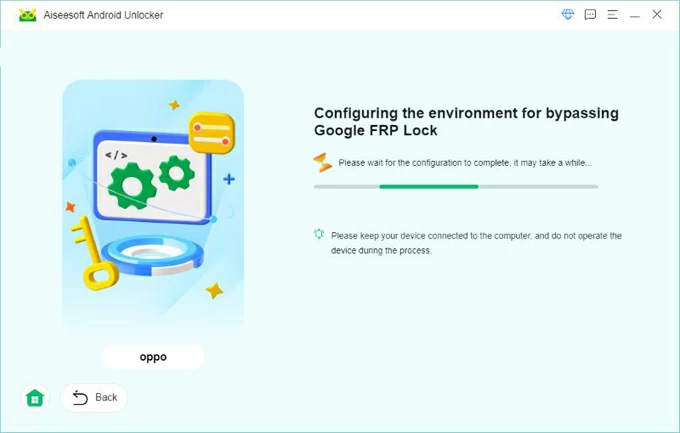
Step 6: Allow the program to perform the FRP unlocking process.
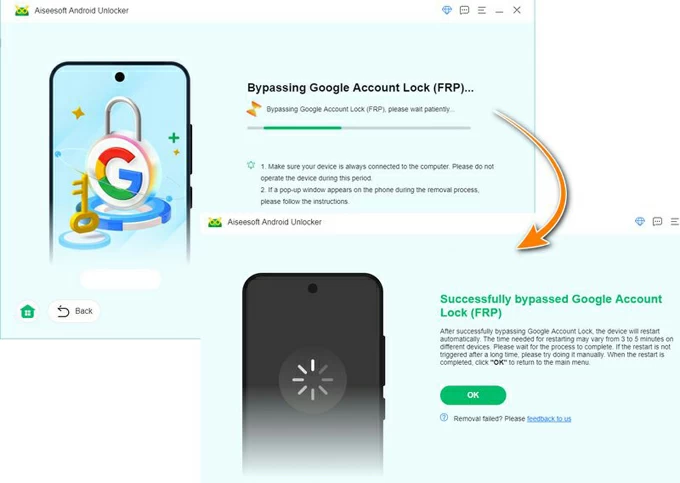
Step 7: Once completed, disconnect the device and restart it.
Notes
- Ensure the battery level is above 50%.
- Use the original USB cable whenever possible.
- Do not disconnect the device during the unlocking procedure.
- Verify compatibility with your Vivo model before starting.
This method is often preferred because it minimizes manual operations and reduces the likelihood of user error.
Method 2: Recover the Original Google Account and Complete Verification
If you are the original owner of the Vivo phone, Google's official account recovery system remains one of the safest methods for bypassing FRP. Instead of removing the protection, this approach restores access to the Google account associated with the device.
This solution is particularly valuable when important personal information is linked to the account. Once access is restored, you can simply sign in during device setup and complete the activation process normally. Although recovery may take some time, it preserves account ownership and maintains the device's security structure.
Detailed Steps
Step 1: On another device, visit Google's account recovery page.
Step 2: Enter the email address associated with the locked Vivo phone.
Step 3: Verify your identity using available recovery methods.
Step 4: Create a new password if prompted.
Step 5: Wait for Google's security synchronization period if necessary.
Step 6: Restart the Vivo device.
Step 7: Enter the recovered Google account credentials during setup.
Important Notes
- Recently changed passwords may require a waiting period before use.
- Recovery success depends on available verification information.
- Keep recovery phone numbers and email addresses updated.
- Avoid multiple failed recovery attempts in a short period.
This method is ideal for legitimate owners who still have access to account recovery options.
Why Vivo Phones Commonly Trigger FRP Lock
Many users assume FRP appears because something is wrong with the phone. In reality, FRP usually activates because Android detects a factory reset that occurred before account removal.
Common causes include:
- Factory resetting through Recovery Mode
- Purchasing a second-hand Vivo phone
- Forgetting Google account credentials
- Receiving a phone from a friend or relative
- Performing a reset after a system crash
Understanding the cause helps determine the most effective solution.
Vivo Data Loss After a System Crash
FRP lock is not the only issue Vivo users frequently encounter. Another common problem occurs when a Vivo device experiences a system crash, boot loop, failed update, or unexpected software malfunction. In these situations, users often discover that important photos, contacts, videos, documents, and chat records have become inaccessible.
This can be even more stressful than an FRP lock because personal memories and valuable business information may be involved.
A typical scenario begins with a Vivo phone freezing repeatedly. The user attempts troubleshooting methods, performs a forced restart, or enters recovery mode. Sometimes the device fails to boot normally afterward. In more severe cases, the phone becomes stuck on the Vivo logo screen, continuously restarts, or displays system errors.
When this happens, many users mistakenly assume their data is permanently lost. However, deleted or inaccessible files are often still recoverable if proper recovery tools are used before new data overwrites the storage.
This is where solutions available through iDATAPP can be valuable. The platform offers software tools designed for Android data management, recovery, backup, and device maintenance. These tools can help users recover lost files from Android devices affected by accidental deletion, software failures, system crashes, rooting mistakes, or storage corruption.
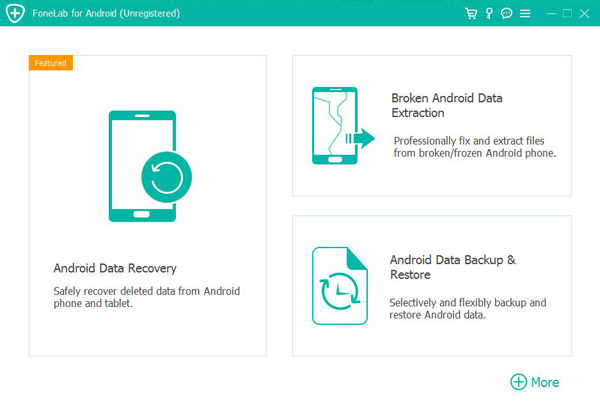
One major advantage of performing data recovery early is that it increases the likelihood of recovering original file structures and media quality. Waiting too long or repeatedly resetting the device can significantly reduce recovery success rates.
To minimize future data loss risks, Vivo users should establish a regular backup strategy. Important photos, videos, work documents, and contacts should be backed up to secure storage locations. Having an updated backup means that even if a device encounters FRP issues, system failures, or hardware problems, critical information remains protected.
Ultimately, FRP removal restores access to the device itself, while data recovery solutions help restore access to the information stored inside the device. Together, these approaches address two of the most common challenges faced by Vivo smartphone users.
Tips to Prevent FRP Lock in the Future
Many FRP issues can be avoided through simple preparation:
- Remove your Google account before performing a factory reset.
- Record your Google account credentials securely.
- Keep recovery information updated.
- Verify account ownership when buying used devices.
- Create regular backups of important data.
- Enable multiple recovery options for your Google account.
These habits significantly reduce the chances of encountering FRP-related problems later.
Frequently Asked Questions
1. What does FRP mean on a Vivo phone?
FRP stands for Factory Reset Protection. It is a Google security feature that prevents unauthorized access after a factory reset.
2. Can I unlock Vivo FRP without a Google account?
Yes, certain FRP removal tools can help remove the verification screen when account credentials are unavailable, provided you have legitimate access to the device.
3. Will unlocking FRP erase my data?
In many situations, the device has already been reset before FRP appears. However, users should always back up important data whenever possible.
4. Why does Google ask for the previous account after a factory reset?
Google uses FRP to verify that the person setting up the device is its legitimate owner, helping protect against theft and unauthorized use.
Conclusion
Unlocking FRP from a Vivo phone can seem overwhelming at first, but the issue is usually solvable once the correct method is chosen. If you still have access to your Google account, recovering and verifying the account remains the safest option. If account access is unavailable, iDATAPP Android Unlocker offers a more direct solution for removing FRP restrictions.
By understanding how FRP works, maintaining account recovery information, and keeping regular backups, Vivo users can avoid future lockouts and protect both their devices and their data.
 English
 Nederlands
 Tiếng Việt
 日本
日本 Español
 Português
 Deutsche
 Français
 Italiano
 Norsk
Norsk Suomalainen
 Svenska
 Dansk
Dansk Ελληνικά
 Türk
Türk русский
 हिंदी
हिंदी தமிழ்
தமிழ் Bahasa Melayu
 ไทย
ไทย 한국어
한국어 Română
 Polskie
 қазақ
қазақ Gaeilge
 繁體中文
繁體中文