
 iPhone Data Recovery
 iOS System Recovery
 iOS Backup & Restore
 iOS WhatsApp Transfer
 iOS FoneTrans
 MobieSync
 Android Data Recovery
 Broken Android Data Extraction
 Android Data Backup & Restore
 iPhone Unlocker
 Best Samsung Phone Unlock Tool
 Android Unlocker
 Win/Mac Data Recovery
 iDATAPP Screen Recorder
 2D&3D Video Converter
 Video Repair Software Ai
 AI Video Converter
 Ai Blu-ray Player
 How to Unlock Huawei Mate 80 Without Password?
Forgot your Huawei Mate 80 password? This guide explores three practical unlocking methods, deep system insights, and solutions for post-unlock data recovery, all explained clearly and originally.
Smartphones are supposed to make life easier—until the moment you stare at your Huawei Mate 80 lock screen, knowing the password is gone from your memory. Maybe it was a pattern you rarely used, a PIN you changed recently, or a fingerprint that stopped responding after a system update. Whatever the reason, being locked out feels less like a technical issue and more like hitting a brick wall.

This article doesn’t just list generic tricks. Instead, it breaks down why Huawei Mate 80 lock issues happen, what really works in 2025, and how to unlock your device without relying on other companies’ professional tools. We’ll analyze the problem, explore realistic solutions, and walk you through three proven methods—including one using our own Android unlocking software—with clarity, depth, and a human tone.
Guide List
- Understanding the Lock Problem on Huawei Mate 80
- Method 1: Unlock Huawei Mate 80 with Android Unlocker Software (Recommended)
- Method 2: Unlock Huawei Mate 80 via Built-in Recovery Reset (Manual Approach)
- Method 3: Unlock Huawei Mate 80 Using Huawei Account Verification
- Data Loss After Unlocking Huawei Mate 80 (A Common Problem)
- FAQs
Understanding the Lock Problem on Huawei Mate 80
The Huawei Mate 80 is built with strong security logic. EMUI and HarmonyOS are designed to protect user privacy aggressively, which is great—until you forget your credentials. Unlike older Android phones, newer Huawei models restrict traditional bypass tricks, disable simple recovery loopholes, and closely tie device access to system integrity and user identity.
Common causes of lockouts include:
- Forgotten PIN, password, or pattern
- Fingerprint or Face ID failure after updates
- Multiple incorrect attempts triggering a temporary or permanent lock
- System glitches after firmware upgrades
- Second-hand devices still bound to previous user settings
Unlocking such a device isn’t about guessing; it’s about choosing the right method for your situation, balancing data safety, time, and technical comfort.
Method 1: Unlock Huawei Mate 80 with Android Unlocker Software (Recommended)
Best for: Users who want a direct, structured, and time-efficient unlocking solution
Data risk: Depends on lock type and device status
When built-in options fail or are too restrictive, a dedicated Android unlocking solution becomes the most reliable route. Our own tool, Android Unlocker, is specifically designed to handle modern Android lock mechanisms, including those used on Huawei devices.
What makes this approach practical is not just automation, but precision. Instead of random system resets, the software communicates with the device at a deeper level, identifying lock modules and guiding the user step by step. You don’t need advanced technical skills, and the interface avoids confusing jargon.
This method is especially helpful if the Mate 80 screen is responsive but inaccessible, or if repeated attempts have locked you out completely.
Step-by-Step Guide
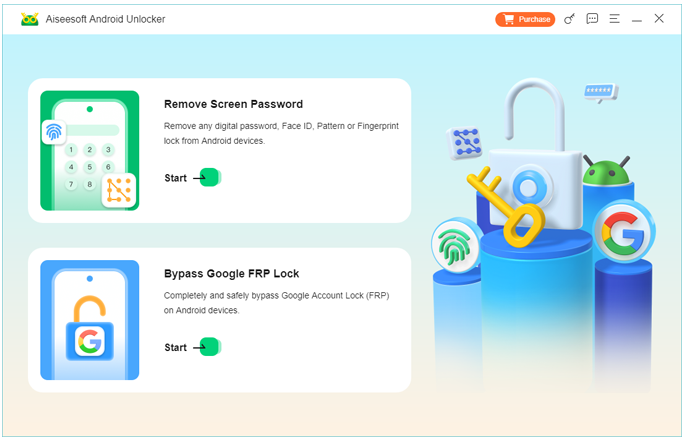
1.Download and install the software on your computer, launch the program and select “Remove Screen Password”
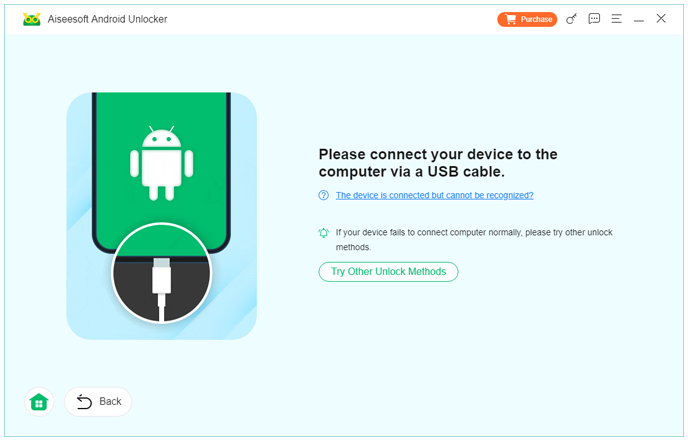
2.Connect your Huawei Mate 80 using a USB cable
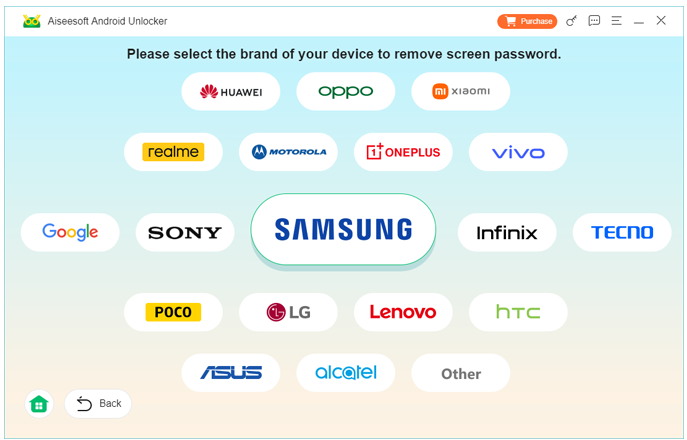
3.Choose the device brand and follow on-screen instructions
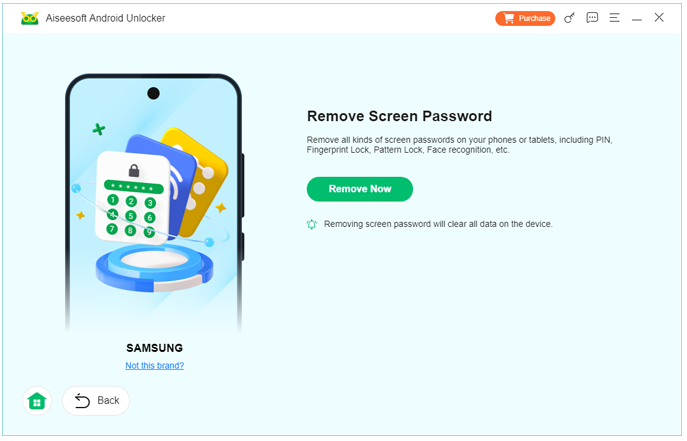
4.Click Remove Now and let the software process the unlock automatically
Important notes:
- Some lock types may require data removal for security compliance
- Ensure stable USB connection throughout the process
- This method works best on devices not physically damaged
Method 2: Unlock Huawei Mate 80 via Built-in Recovery Reset (Manual Approach)
Best for: Users who don’t mind data loss and want a system-level solution
Data risk: High (factory reset involved)
If you’re unable to access the system at all, Huawei’s recovery environment remains a built-in fallback. While this method won’t preserve personal data, it’s still relevant for users who prioritize regaining access over recovery.
The Mate 80’s recovery mode operates independently from the main OS, which means it can clear lock credentials by resetting system configurations. However, newer Huawei firmware versions may still require account verification afterward.
This approach is less flexible but doesn’t require additional tools or downloads.
Step-by-Step Guide
- Power off the Huawei Mate 80 completely
- Press and hold Volume Up + Power simultaneously
- Release buttons when the Huawei logo appears
- Enter Recovery Mode
- Select Wipe data/factory reset using volume keys
- Confirm and wait for the reset to complete
- Reboot the device
Notes:
- All user data will be erased
- You may need original Huawei account credentials after reset
- Not ideal for second-hand phones with unknown accounts
Method 3: Unlock Huawei Mate 80 Using Huawei Account Verification
Best for: Users who remember their Huawei account but forgot screen lock
Data risk: Low
Sometimes the lock screen isn’t the real problem—the account is. If your Mate 80 is still linked to your Huawei ID and you remember the login credentials, you can regain access through official verification.
This method relies on cloud authentication rather than device-side tricks. Once verified, you can reset the lock settings from within the system environment or during setup after a restart.
It’s slower than software-based unlocking but preserves data and stays within Huawei’s security ecosystem.
Step-by-Step Guide
- Restart the Huawei Mate 80
- Trigger lock screen and select Forgot Password (if available)
- Log in using your Huawei ID and password
- Complete identity verification (SMS/email)
- Reset screen lock settings
- Access the device normally
Notes:
- Requires active internet connection
- Huawei ID must be previously linked
- Not available on all firmware versions
Data Loss After Unlocking Huawei Mate 80 (A Common Problem)
Unlocking the phone is only half the story. In real-world cases, many Huawei Mate 80 users face a second problem immediately after: data loss. Factory resets, system crashes, failed updates, or forced unlocks can erase photos, messages, videos, contacts, and app data without warning.
Huawei devices are particularly sensitive to system-level changes. A failed HarmonyOS update or repeated unlock attempts can corrupt partitions, making data inaccessible even after successful unlocking. This is especially frustrating when backups were never enabled.
In such cases, professional Android data recovery software becomes essential. Tools available on idatapp.com are designed to scan Huawei devices deeply, even when the system has been reset or partially damaged. Unlike cloud-based backups, recovery software works directly with device storage and SD cards, extracting recoverable data fragments safely.
For example, after unlocking a Mate 80 through recovery reset, users often discover their gallery empty. With dedicated data recovery solutions, it’s possible to retrieve deleted photos, videos, WhatsApp chats, documents, and even app data—provided the storage hasn’t been overwritten extensively.
This scenario highlights an important lesson: unlocking and data safety are closely connected. Choosing the right combination of tools can mean the difference between temporary inconvenience and permanent data loss.
FAQs
Can I unlock Huawei Mate 80 without losing data?
Yes, if you use Huawei account verification or compatible unlocking software. Factory reset methods usually erase data.
Does Huawei Mate 80 support fingerprint-only unlocking recovery?
No. If biometric unlocking fails, you must use PIN, password, or alternative methods.
Is it safe to use Android unlocking software?
When using reputable tools designed for modern Android systems, yes. Always avoid unknown or pirated programs.
What if my Mate 80 is second-hand and locked?
You’ll likely need an unlocking tool. Huawei account verification won’t work without the original credentials.
Can I recover data after a factory reset on Mate 80?
In many cases, yes—using specialized Android data recovery software before new data overwrites storage.
Final Thoughts
Being locked out of your Huawei Mate 80 isn’t the end of the road—it’s a technical detour. Whether you choose a smart software-based unlock, a manual reset, or account verification, the key is understanding your situation and acting deliberately. With the right tools and knowledge, access—and even your data—can often be restored.
 English
 Nederlands
 Tiếng Việt
 日本
日本 Español
 Português
 Deutsche
 Français
 Italiano
 Norsk
Norsk Suomalainen
 Svenska
 Dansk
Dansk Ελληνικά
 Türk
Türk русский
 हिंदी
हिंदी தமிழ்
தமிழ் Bahasa Melayu
 ไทย
ไทย 한국어
한국어 Română
 Polskie
 қазақ
қазақ Gaeilge
 繁體中文
繁體中文